TL;DR
- React Native's default startup evaluates the entire JS bundle — all modules, all screens — before rendering a single frame
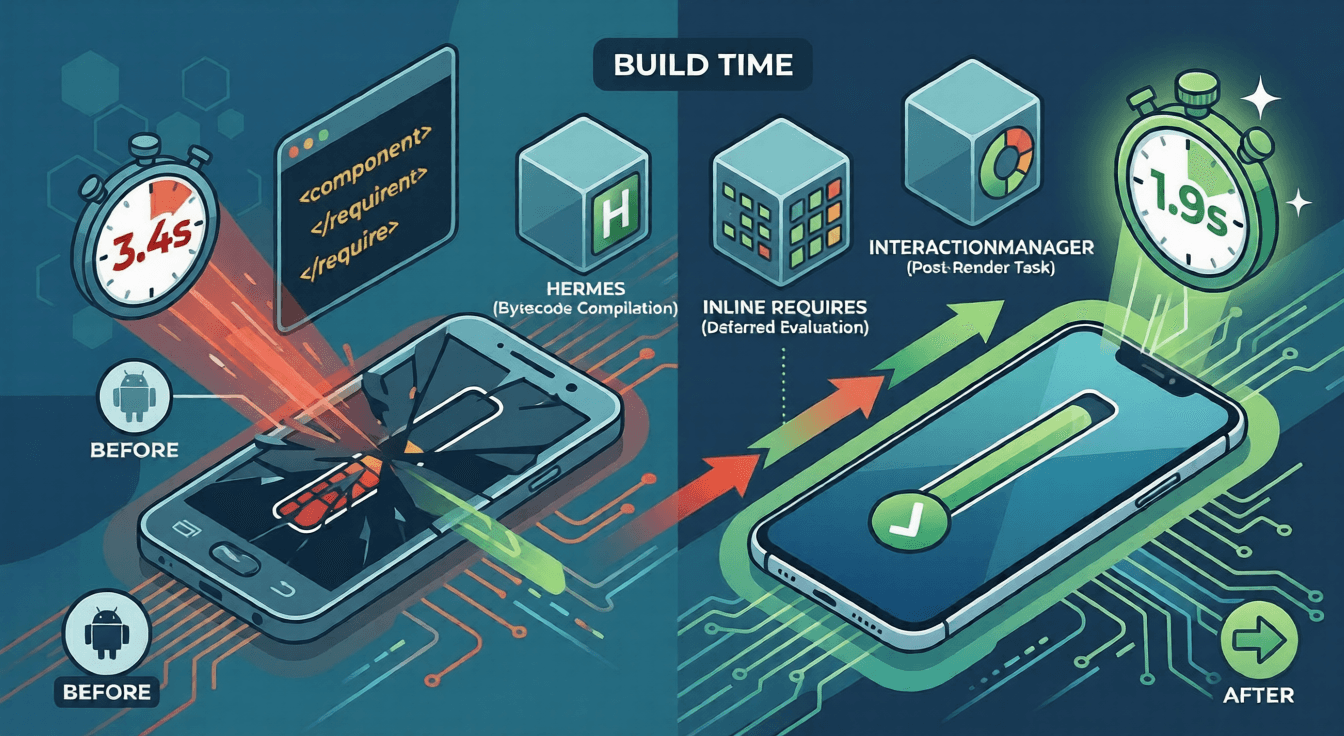
- Enabling Hermes dropped our Android cold start from 3.4s to 2.8s by eliminating the runtime parse-and-JIT step
- Metro's
inlineRequirescut another 400ms by deferring module evaluation from startup to first use InteractionManagerremoved 300ms of blocking init work by pushing non-critical tasks past the first paint- Firebase Remote Config blocked startup on every launch — switching to a cache-first pattern (activate cached values immediately, fetch fresh in background) cut 1.5–3s from cold start for returning users
- Combined: 3.4s to 1.9s on a Redmi Note 12 — without touching a single product feature
Cold start is the time from the user tapping your app icon to the first interactive screen appearing. On iOS it's often fast enough to go unnoticed. On mid-range Android — Redmi Note, Galaxy A-series, the hardware that dominates emerging markets — it's where users decide whether to stay.
A 3-second cold start is a blank white screen. Users don't file a bug report. They open a competitor's app.
React Native apps are slow to start for a structural reason: the entire JavaScript bundle loads and every module in it evaluates before React renders its first frame. That's the default. The optimizations below each remove one piece of that cost, in order of impact.
What's Actually Happening at Startup
Before changing anything, know what you're measuring. The startup sequence on Android from process launch to first visible frame:
- Native process starts — Android creates the app process and loads the native binary
- RN runtime initializes —
ReactInstanceManagersets up the JS execution environment - Bundle loads — the full JS bundle is read from disk into memory
- Bundle evaluates — every
require()in the bundle runs in dependency order, initializing all modules - Root component renders — React builds the initial component tree
- Views flush to screen — the layout engine computes positions and the GPU paints the first frame
Steps 3 and 4 dominate. On a 200-screen app, this means every navigator, every screen component, every utility module — all of it runs at startup, regardless of whether the user will ever reach most of it.
Establish a Baseline Before Touching Anything
Optimization without measurement is guesswork. Two tools, five minutes:
Native startup time (Android)
adb shell am force-stop com.yourapp
adb shell am start -W -n com.yourapp/.MainActivity
TotalTime in the output is your number — process creation to first activity frame. Run it 10 times on a physical mid-range device and take the median. Single runs are unreliable due to OS scheduling variance.
JS-side timing
// index.js — app entry point
global.__APP_START_TIME__ = Date.now();

// Root component
useEffect(() => {
  const ms = Date.now() - global.__APP_START_TIME__;
  analytics.track('app_cold_start', { duration_ms: ms });
}, []);
Together these tell you where the time is going: native init vs JS evaluation. They point at different fixes.
1. Enable Hermes
The highest-leverage single change for Android startup.
Without Hermes, the app loads raw JavaScript and the V8 engine parses and JIT-compiles it at runtime — on every cold start. On mid-range hardware with a weak JIT, that parse step alone adds 500–700ms before a single line of your code runs.
Hermes compiles your bundle to bytecode at build time. The device loads pre-compiled bytecode. No parse step, no JIT warmup.
Android — android/app/build.gradle:
project.ext.react = [
  enableHermes: true
]
iOS — Podfile:
use_react_native!(
  :path => config[:reactNativePath],
  :hermes_enabled => true
)
React Native 0.70+ ships with Hermes on by default. If you're on an older version, this is the first thing to change — before touching bundle size, lazy loading, or anything else.
Measured impact across devices (cold start, median of 10 runs):
| Device | Without Hermes | With Hermes | Delta |
|---|---|---|---|
| Redmi Note 12 | 3.4s | 2.8s | -600ms |
| Samsung Galaxy A32 | 2.9s | 2.4s | -500ms |
| iPhone 13 | 1.4s | 1.2s | -200ms |
The gap is widest on low-end Android precisely because those devices have the weakest JIT compilers. Hermes was built for that hardware profile.
2. Reduce What Loads at Startup
Hermes eliminates the parse cost. The next problem is evaluation cost: all those modules still run, and many of them shouldn't run until they're needed.
Defer module evaluation with inlineRequires
By default, Metro evaluates every require() in your bundle in dependency order at startup. Any module imported at the top of a screen file — a charting library, a PDF viewer, a camera interface — runs its initialization at launch, even if the user never visits that screen in this session.
Metro's inlineRequires transforms imports so they're evaluated at first call, not at module load. metro.config.js:
const { getDefaultConfig } = require('@react-native/metro-config');

const config = getDefaultConfig(__dirname);

config.transformer.getTransformOptions = async () => ({
  transform: {
    experimentalImportSupport: false,
    inlineRequires: {
      blockList: {
        // Modules with startup side effects — keep these eager
        [require.resolve('./src/services/analytics.js')]: true,      // registers event tracking
        [require.resolve('./src/services/errorReporting.js')]: true,  // registers global error handlers
      },
    },
  },
});

module.exports = config;
On our 200-screen app, this dropped modules evaluated at startup from ~380 to ~60. The rest initialize only when their screen is first visited.
Modules in the blockList still evaluate at startup. Any module that registers global error handlers, sets device context, or has other side effects beyond its exports needs to be listed here — otherwise those handlers won't be registered until the module is first imported somewhere in the component tree, which in some flows may never happen. Test thoroughly after enabling; race conditions in module initialization are the most common failure mode.
3. Defer Everything Non-Critical
With Hermes and inlineRequires in place, the remaining startup cost comes from work that runs during the component mount cycle. Analytics setup, push token registration, cache hydration — these are often sitting inside useEffect calls firing at the same time as the initial render, competing with the first paint for JS thread time.
InteractionManager.runAfterInteractions
InteractionManager delays a callback until all current interactions and animations have completed — which in practice means after the startup render finishes and the screen is visible.
import { InteractionManager } from 'react-native';

function App() {
  useEffect(() => {
    // Critical — must resolve before rendering authenticated screens
    validateAuthToken();
  }, []);

  useEffect(() => {
    const task = InteractionManager.runAfterInteractions(() => {
      // Deferred — runs after first frame is visible
      initAnalytics();
      registerPushToken();
      prefetchNextScreenData();
    });

    return () => task.cancel();
  }, []);

  return <RootNavigator />;
}
The deferred work still runs on the JS thread — but the user has already seen the app. The cost is invisible.
What belongs in runAfterInteractions:
- Analytics and event tracking setup
- Push notification token registration
- User preference hydration not required by the first screen
- Background data prefetch for likely next screens
What does not belong there:
- Auth token validation
- Navigation state restoration
- Any data the first screen needs to render
- Firebase Remote Config initialization — that has its own blocking requirement on first launch, covered in the next section
Don't mount the navigation tree before auth resolves
Rendering a full NavigationContainer with all navigators registered while simultaneously resolving auth state is unnecessary work. A tab navigator with five stacks builds internal state for all of them at startup — including screens the user may never reach.
function App() {
  const authStatus = useAuthStatus(); // 'loading' | 'authenticated' | 'unauthenticated'

  // While auth resolves, render nothing but the splash screen
  if (authStatus === 'loading') {
    return <SplashScreen />;
  }

  return (
    <NavigationContainer>
      {authStatus === 'authenticated' ? <AppNavigator /> : <AuthNavigator />}
    </NavigationContainer>
  );
}
On tab navigators, lazy: true prevents tab stacks from mounting until first visited. It's the default in React Navigation v6+, but worth verifying it's not been explicitly disabled:
<Tab.Navigator screenOptions={{ lazy: true }}>
  <Tab.Screen name="Home" component={HomeStack} />
  <Tab.Screen name="Search" component={SearchStack} />
  <Tab.Screen name="Profile" component={ProfileStack} />
</Tab.Navigator>
4. Stop Blocking on Firebase Remote Config
If your app uses Firebase Remote Config, it's likely one of the biggest cold start offenders you haven't measured yet.
The default pattern — call fetchAndActivate() at startup and wait — issues a network request before rendering anything. On a good connection that's 300–500ms. On a slow 4G connection common in emerging markets, we measured 3–5 seconds. The app sat on a blank screen while waiting for a config response that, for a returning user, was almost certainly identical to what they already had.
The fix is to separate activation from fetching.
Firebase Remote Config has a built-in local cache. activate() loads whatever was fetched in a previous session — it's an instant disk read, no network. fetch() pulls fresh values from the server. These two operations do not have to happen together.
How the pattern works
On first launch (empty cache), you must block: there are no cached values, so fetchAndActivate() runs synchronously. This is unavoidable and only happens once.
On every subsequent launch, activate the cached values immediately and fetch the update in the background. The user gets config instantly. The fresh values land in cache and are ready for the next launch.
const REMOTE_CONFIG_FETCH_TIMEOUT_MS = 15000;
const REMOTE_CONFIG_MIN_FETCH_INTERVAL_MS = 3600000; // 1 hour

export const initializeRemoteConfigs = async (
  defaults: Record<string, string | boolean | number>,
) => {
  const remoteConfig = getRemoteConfig();

  await setConfigSettings(remoteConfig, {
    fetchTimeMillis: REMOTE_CONFIG_FETCH_TIMEOUT_MS,
    minimumFetchIntervalMillis: __DEV__ ? 0 : REMOTE_CONFIG_MIN_FETCH_INTERVAL_MS,
  });
  await setDefaults(remoteConfig, defaults);

  // activate() loads the previously-fetched cache from disk — no network, instant.
  // Returns true when cached values exist (2nd+ launch), false on the very first launch.
  const hasCachedValues = await activate(remoteConfig);

  if (hasCachedValues) {
    // Fast path: cached values are already active.
    // Fetch fresh values in the background for the next launch.
    fetchRemoteConfig(remoteConfig).catch((err) => {
      recordError(err, 'background remote config fetch failure');
    });
  } else {
    // Slow path: no cache yet (first ever launch).
    // Block until fetch completes so we start with correct config.
    await fetchAndActivate(remoteConfig);
  }

  return remoteConfig;
};
The Firebase SDK handles the cache storage itself — Android writes to SharedPreferences, iOS to NSUserDefaults. You don't manage any storage layer.
Wiring it into startup
The config initialization runs at the app entry point, before the root component mounts:
const AppEntry = () => {
  const [ready, setReady] = useState(false);

  useEffect(() => {
    const init = async () => {
      // allSettled so a failure in one doesn't cancel the other
      await Promise.allSettled([
        initRemoteConfig(),
        initCrashReporting(),
      ]);
      setReady(true);
    };

    init();
  }, []);

  if (!ready) return null;

  return <App />;
};
One thing to be deliberate about: the if (!ready) return null gate. On first launch this blocks the render until config is fetched — expected. On every subsequent launch, activate() completes in under 10ms and the gate is essentially invisible.
Measured impact
On our app, Firebase Remote Config was blocking startup on every launch:
| Launch type | Before | After | Delta |
|---|---|---|---|
| First launch | 4.2s | 3.8s | -400ms |
| Returning user (good connection) | 3.1s | 1.4s | -1.7s |
| Returning user (slow 4G) | 4.9s | 1.2s | -3.7s |
The first launch improvement is smaller because it still blocks on the fetch. The returning user improvement is significant because it eliminates the network wait entirely from the critical path.
One config key to set correctly: minimumFetchIntervalMillis. In production we use 3600000ms (1 hour). Set it too low and you burn quota; set it to 0 in development so you can test changes without waiting.
What We Got Wrong
We started with bundle size, not startup sequence
The first two weeks were spent on dependency audits. We replaced moment with dayjs, swapped the full lodash build for lodash-es, and removed three libraries we no longer used. Bundle size dropped by 180KB.
Cold start time dropped by 40ms. Not 400ms — 40ms.
The mistake was optimizing for download size when the real cost was evaluation time. A smaller bundle still evaluates every module at startup. The correct order is: Hermes removes parse cost, inlineRequires removes evaluation cost, then bundle size matters for everything else. We did it backwards and lost two weeks.
inlineRequires silently broke our analytics
Enabling inlineRequires without a blocklist broke our Sentry integration and analytics initialization. Both SDKs have module-level side effects that need to run at startup — registering global error handlers, setting device context. When their evaluation got deferred, those handlers weren't registered until the module was first imported somewhere in the component tree, which in some flows was never.
We didn't catch it in testing. We caught it two days after deploying when our event pipeline showed a 30% drop in session starts. The fix was adding both to the inlineRequires blocklist. The lesson: any module with side effects beyond its exports needs to be explicitly excluded before you enable this.
InteractionManager doesn't help if your first screen is slow
After deferring all startup work, the home feed still felt sluggish. We spent a week assuming the InteractionManager deferrals weren't taking effect. They were. The home feed was fetching, transforming, and rendering 40 list items on mount — a render performance problem, not a startup problem.
Cold start was done. The jank we were still seeing was something else entirely. We eventually fixed it with FlashList and virtualization, but we should have measured the two separately from the start.
Known limitations
The gains documented here are for Android. On iOS, Hermes still helps — but 100–200ms rather than 500–700ms, because Apple silicon has a stronger JIT. inlineRequires gains hold across both platforms.
inlineRequires also trades startup cost for first-navigation cost: the first time a deferred module loads, the user pays for it. On screens visited immediately after launch — a home feed, a product listing — measure first-navigation time alongside cold start. Optimizing startup while degrading the first screen transition is not a win.
Every optimization in this post targets the same thing: work that runs before the user sees anything. Hermes removes the parse step. inlineRequires defers module evaluation. InteractionManager pushes invisible init work past the first frame. Firebase Remote Config's cache-first pattern eliminates the network wait for every returning user.
None of them require rewriting product code. Each is independently measurable with a five-minute setup. The order matters: start with Hermes, measure, then move down the list. Don't touch inlineRequires without understanding which modules have startup side effects, and don't call fetchAndActivate at startup when you already have cached values sitting on disk.
The time was always being spent. These changes just move it somewhere the user can't see.