
Most headless Shopify integrations treat the platform's login screen as something to work around. Hide it. Skip it. Route the customer somewhere else entirely.
We did the opposite. We let Shopify keep asking for a login screen — and just made sure our screen is the one that shows up. Here's why, and what it actually took to make that work.
What is Shopify's Customer Account API?
Shopify's old headless login method, Multipass, is being retired. Its replacement is the Customer Account API — an OAuth flow where the browser always passes through shopify.com at some point. That part isn't optional. It's baked into how OAuth works, and nobody building on this API escapes it.
What is optional is whose login screen the customer actually sees. By default, it's Shopify's own — and Shopify's own screen only takes an email. No phone number. No OTP.
In India, almost everyone signs in by phone. That's not a design preference we could route around. It's a hard mismatch with what Shopify ships out of the box.
The fix: become Shopify's identity provider
Instead of fighting that constraint, we registered our own login page as Shopify's identity provider. Now, whenever Shopify needs someone identified, it comes to us — instead of rendering its own screen.
The result: the only login screen a customer ever sees is ours. Phone number, OTP, done. The browser still transits shopify.com along the way, but no Shopify login screen ever appears on it.
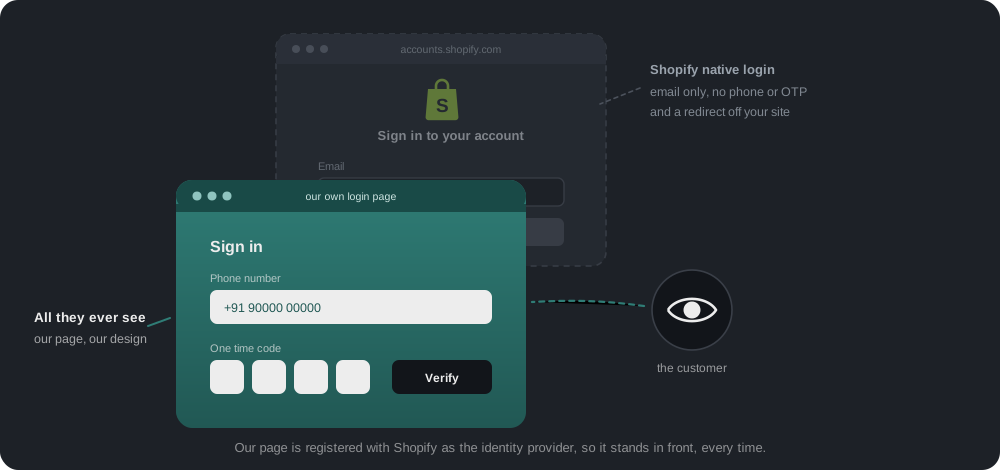
Phone and email are linked to the same customer at signup, so a phone login on our side resolves to a real Shopify customer on theirs. Checkout and order history keep working exactly as Shopify expects.
The catch nobody warns you about
Here's what that setup actually costs: two separate memories of who is logged in. Ours, and Shopify's.
Most of the time they agree. But neither system updates or erases the other automatically — and that one fact explains almost everything about how login and logout behave in this architecture. We handled every way the two can drift apart, deliberately, instead of hoping they'd stay in sync.
It's live on bombayshirts.com today. Five scenarios cover it.
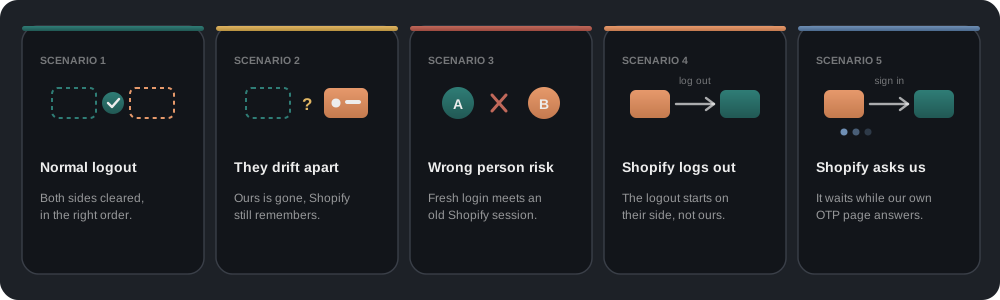
Scenario 1: A normal logout
The customer clicks "Log out." It looks like one click. Underneath, two separate memories need updating, and the order matters:
- Read the id token first, while the record still exists. Shopify will only end its session if we hand back the id token stored on our record. Delete the record first, and that token is gone for good.
- Build Shopify's logout link from it.
buildShopifyLogoutUrlproduces the same logout Shopify would run if the customer clicked its own logout button. - Delete our own session record. From our side, they're now logged out.
- Clear our short-lived cache. A separate cache says "trust this session for about a minute" — skip clearing it, and a logged-out session keeps working for that minute.
Then the browser makes a quick trip through Shopify's logout link and comes straight back. It's a redirect, not a screen — the customer sees nothing, but Shopify's session genuinely ends.
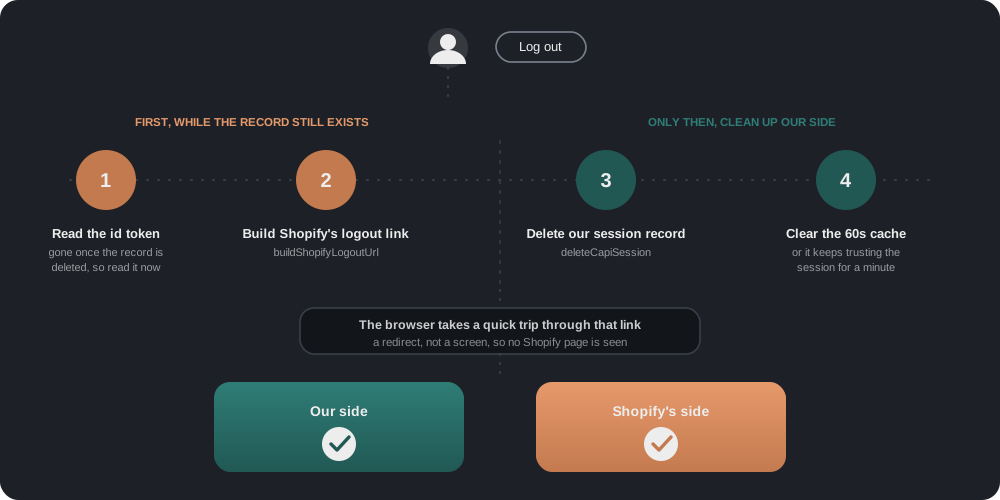
Once all four steps finish, both sides agree: nobody is logged in, anywhere.
Scenario 2: We say logged out, Shopify disagrees
This isn't something we build on purpose. It's just what can happen once two separate memories exist.
Why it happens. Our side can lose track of a session without a clean goodbye — it expires naturally, gets removed for some other reason, or a logout attempt fires but the final call to Shopify fails to land.
What it looks like. Our website correctly reports the customer as logged out — from our own records, there's nothing left to say otherwise. But Shopify was never told. It only updates when something explicitly asks it to, so its memory just keeps going.
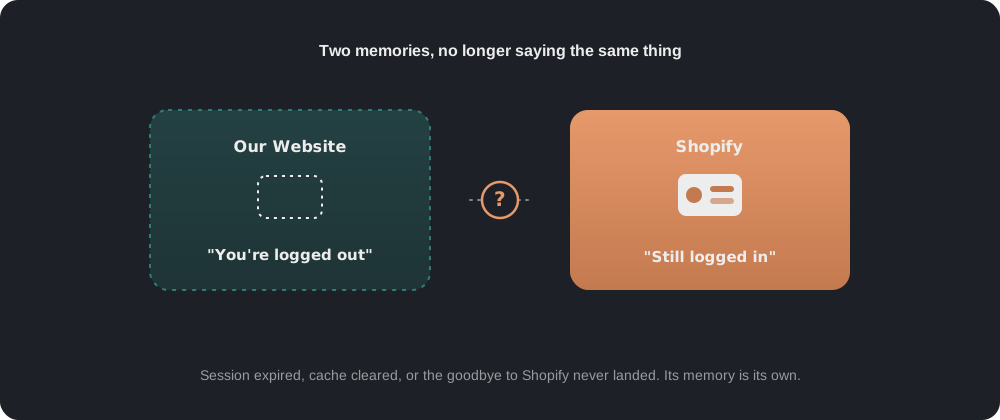
Nothing breaks immediately here. But it's exactly the setup that makes the next scenario possible.
Scenario 3: A new login walks into an old memory
The tricky one — and the reason we built an extra safety check into login at all.
- A customer logs in with a one-time code. Our system is completely confident about who this is. Call them Customer A.
- The browser still has an old session remembered by Shopify — maybe from an earlier visit, maybe from someone else who used this browser before.
- Shopify reuses that old session instead of asking us again. Normally it would come back and ask who this is. Here it already has something on file, so it skips that step and hands back whatever identity that old session belonged to. That might be Customer A again. It might genuinely be someone else.
- We don't trust that answer blindly. We ask Shopify directly who the session belongs to, and compare that against Customer A — the identity our own OTP already confirmed.
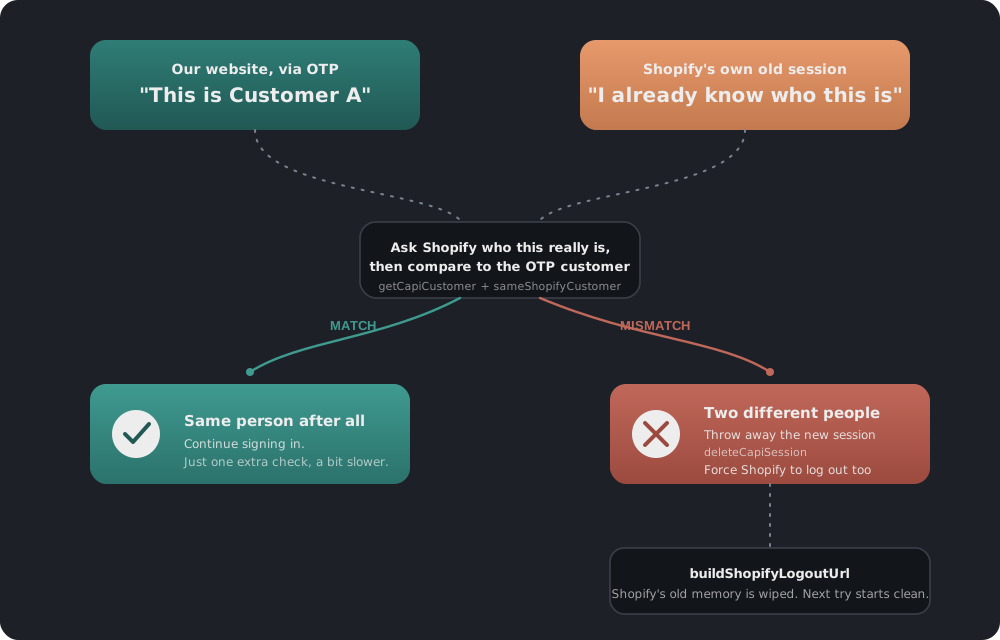
If the two match: nothing was actually wrong. The login continues, one extra check slower than usual.
If they don't match: we throw away the session we just created, before it ever reaches the browser. buildShopifyLogoutUrl runs again, silently, to clear the stale session on Shopify's side.
That cleanup is the part that matters. Skip it, and every retry keeps landing on the same wrong customer until Shopify's stale session expires on its own.
Scenario 4: Shopify starts the logout, not us
Every scenario so far starts on our website. This one runs the other way — a customer clicks "Sign out" from inside a screen Shopify controls, most commonly its own checkout.
- Shopify calls our logout endpoint, and tells us where to send the customer once we're done — the checkout page they were already on.
- We end our own session and send them straight back. Logged out on both sides, no detour.
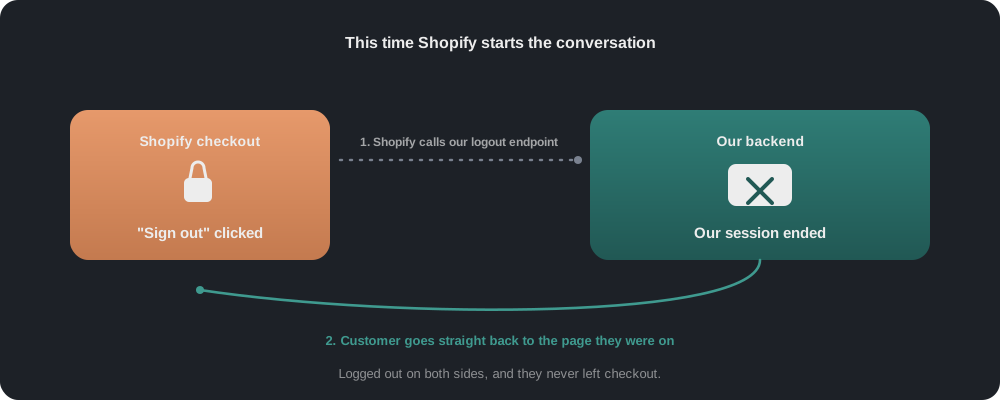
The useful thing to notice: keeping two memories in sync isn't only about us reaching out to Shopify. Shopify reaches out to us too, and our side has to answer properly when it does.
Scenario 5: Shopify starts the login, not us
The mirror of Scenario 4. A customer is in checkout, not signed in, and clicks "Sign in" there. That click goes to Shopify first, not us.
- Shopify hands the browser over to us, asking us to identify this person. Nothing sits open on a wire — we just record a pending request, good for ten minutes.
- We show our own login page — same phone-and-OTP screen as always. The customer never sees a Shopify login screen, even though Shopify is the one who asked.
- Once the code is verified, we answer Shopify. It closes out the login it was holding, and the browser lands back in checkout, signed in.
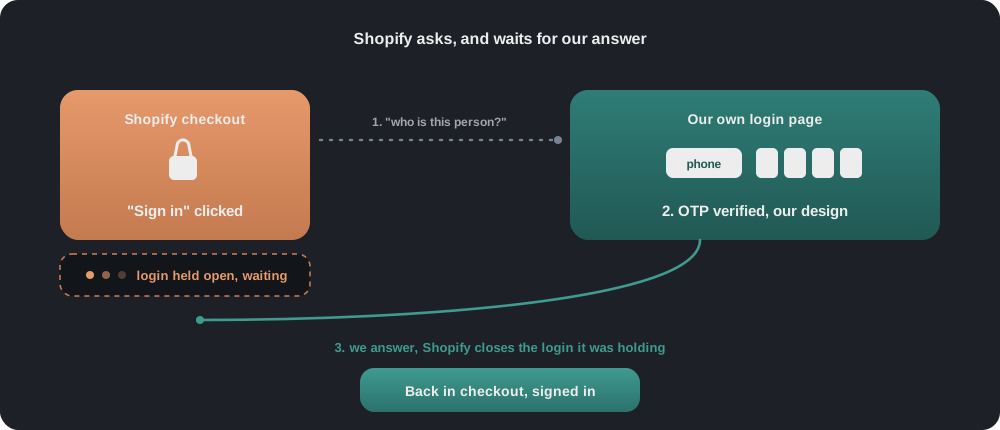
The difference from a normal login is who moves first. Same OTP page either way — two different orders of events underneath.
A smaller detail: finding the customer at all
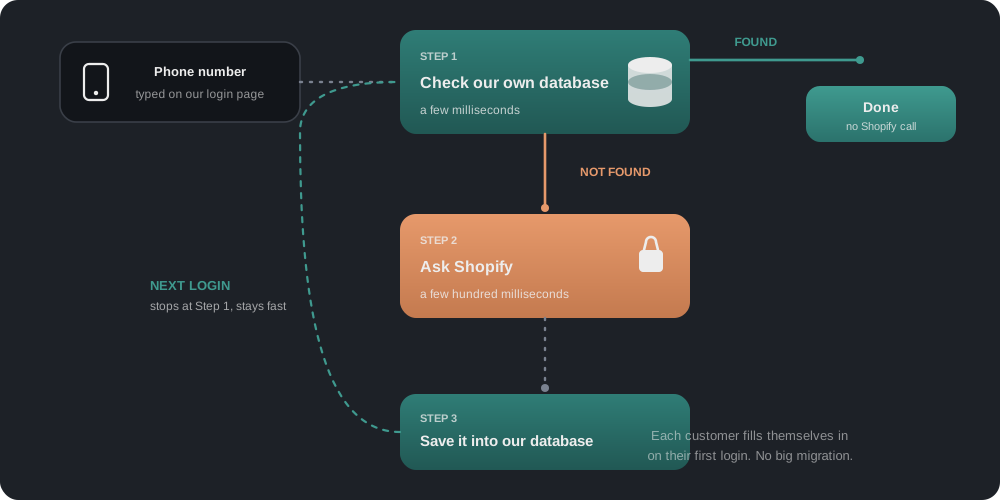
When someone types a phone number, we check our own customer table first. A hit takes a few milliseconds and never touches Shopify. A miss means a real call to Shopify's Admin API — a few hundred milliseconds — and we cache that answer so the next login for that person is a hit.
No bulk data migration was needed. All 612,884 customers already lived in Shopify. Instead of copying them across upfront, each one fills themselves in the first time they log in — so the share of logins that still need Shopify keeps shrinking on its own.
Why not just trust Shopify's answer?
It would be simpler. Fewer checks, faster logins, less code.
But that simplicity only holds if the two memories always agree. They don't — not because either system is broken, but because they're genuinely separate, and separate things drift apart over time. A session that outlives a logout. A browser that gets reused. A customer who logs in from checkout, then again from our own site minutes later. Any of these can put Shopify's memory slightly out of step with ours.
Once you accept the two can disagree, the only honest option is to check. Not to distrust Shopify — to confirm, every time, that "the person who just proved themselves to us" and "the person Shopify's session belongs to" are the same person.
Most of the time that check passes instantly, and nobody notices it happened. Occasionally it catches something real. That's exactly the moment it exists for.
The takeaway
We're not fighting Shopify's login behavior, or routing around it. We're going along with it — while keeping one small, quiet check in place for the moments where going along with it blindly would have been the wrong call.