
TL;DR
- AI's React Native gap is structural, not random. The training corpus is web-first. React Native is a fraction of that data. When AI fills gaps, it fills them with web assumptions.
- The code compiles. TypeScript passes. The simulator runs. The real problems appear later — on device, in production, after you've already shipped the assumption.
- You cannot prompt your way past a training data gap. What you can do is fill it yourself before AI fills it with the wrong thing.
- CLAUDE.md is not a hints file. It's a contract — the decisions you make once so AI never invents them fresh each session.
- Write CLAUDE.md before you write a single feature. That one file decides whether your project stays coherent or drifts into a different architecture every week. There is no neutral.
- Skills load contextual depth on demand. Together with CLAUDE.md, they replace the RN-specific knowledge that didn't make it into the training data.
The first time I noticed something was off, I was scrolling a list. The list had 180 items. On the simulator it was fine. On a real Android device the screen hung for three seconds before it would respond to touch. I’d already merged the PR. The list was built with ScrollView and a .map(). Every item mounted at once. I hadn’t asked for that. I’d asked for “a scrollable list of X”. Claude had given me the web version — an array in a scroll container — and I’d accepted it because it compiled and looked right.
I spent the next few weeks blaming my prompts. I tried being more specific. I tried smaller tasks. The output improved at the edges. The core stayed the same: code that felt like React written by someone who’d read the React Native docs once. Platform.OS ternaries instead of Platform.select(). StyleSheet patterns that looked like CSS with a different extension. Scroll behavior that belonged in a browser, not on a phone. The problem wasn’t how I was asking. The gap was in the model — and it was structural.
Why the gap exists
Models learn from what’s on the internet. Stack Overflow, GitHub, docs, blogs, open source. That corpus is dominated by web. React has orders of magnitude more examples than React Native. When the model hits something it’s unsure about — a sparse API, an RN-only pattern, a thin wrapper over a native SDK — it fills the gap. On the web the fill is usually safe; it’s seen enough. On React Native the fill is a web assumption in RN clothing. Not a bug. A direct result of the training data.
The mistakes cluster exactly where RN and web diverge: native animations, platform-specific behavior, device APIs, list virtualization, gesture handling. You can’t prompt your way out of a data gap. You can only compensate.
From the first line of code, something is deciding your architecture. Either you do it once, in a file the model actually reads, or the model does it for you — again and again, differently every session. The first file you create in a new React Native project should be CLAUDE.md. Not "after the first screen." Not "when things get messy." First. Because every AI-assisted change from that point on will either follow that file or invent its own rules. There is no neutral. No CLAUDE.md means the model is the architect, and it has amnesia between sessions.
The dangerous part: it looks correct
Nothing fails at compile time. TypeScript is happy. The simulator runs. So you ship.
The model doesn’t say “I’m guessing here”. It fills every hole with confidence. For React Native, that guess is often the web analogue. You find out later: jank on device, gesture conflicts, “works on iOS, broken on Android”. By then the code is in main.
I used to assume Claude knew React Native the way it knew React. When the output was wrong I assumed I’d asked wrong. I’d rephrase, add context, slice the task. Sometimes it helped. Often the wrongness just moved. Once I understood the structural cause — training data, not prompt quality — how I used AI changed completely.
Where the gap shows up
The gap isn’t uniform. Simple screens — forms, settings, static layouts — are usually fine once the stack is clear. The problem shows up in a few high-signal places.
ScrollView on list data. Given “list of items”, the model reaches for ScrollView and a .map(). Web instinct. ScrollView mounts everything. 20 items: no problem. 200 on a real device with navigation in the mix: you hit the same hang I did. FlashList virtualizes and recycles cells — it's 5x faster on initial render than FlatList and eliminates blank frames on fast scrolls. One rule in CLAUDE.md wipes out the whole class of mistake:
Use FlashList for all lists. FlatList only if FlashList is unavailable.
Never use ScrollView for list data.
Untyped navigation. With React Navigation v7 and TypeScript, every navigate should be typed against RootStackParamList. The model doesn’t know your param list, so it emits the untyped version. navigation.navigate('ProfileScreen') type-checks but gives you no autocomplete, no errors when params change, no safety on renames. Define the rule once:
All navigation.navigate() calls must be typed.
Use useNavigation<NativeStackNavigationProp<RootStackParamList>>()
These aren’t corner cases. They’re the defaults when the model extrapolates from web. Better prompts don’t fix it. Defining “correct” for your project before the model guesses does.
CLAUDE.md: the file that decides where your project goes
CLAUDE.md sits at the project root. Claude reads it at session start and keeps it loaded. What’s in there isn’t "helpful context". It’s the only place you get to lock in your architecture. Everything you don’t define, the model invents — and reinvents in the next session, differently. That’s how you get three animation libraries, two styling patterns, and navigation that’s typed in one place and untyped in another. Not because the product changed. Because the model was the architect, and it has no memory.
Most people treat CLAUDE.md as a tips file you add when the project is already moving. Wrong. It’s the steering document. Write it before you write feature code, or the project will drift. Without it your codebase doesn’t just look inconsistent — it was literally designed by a different architect every time you opened a new chat.
Here’s what I actually use for a React Native app:
# Stack

- React Native CLI (not Expo)
- React Navigation v7 — typed routes via RootStackParamList
- NavigationContainerRef for navigation outside components
- Zustand — auth, user, and UI stores. Selectors co-located with slices.
- Axios with interceptors — base URL from ENV, typed error envelope
- react-native-safe-area-context for SafeAreaView — not core RN
- Always use Animated from react-native-reanimated, not from react-native

# Component structure

- Props interface at the top, above the component function
- StyleSheet.create at the bottom of every file
- No inline styles anywhere

# Platform handling

- Platform.select() for all platform-specific values
- Never Platform.OS inside a ternary inline in JSX

# Lists

- Use FlashList for all lists (@shopify/flash-list)
- FlatList only if FlashList is unavailable
- Never use ScrollView for list data

# Navigation

- All navigation.navigate() calls must be typed
- Use useNavigation<NativeStackNavigationProp<RootStackParamList>>()

# Folder structure

src/screens, src/components, src/services, src/store, src/hooks, src/utils
With that in place Claude stops acting like a web dev guessing at RN and starts acting like someone who read your docs. The win isn’t “better code” in the abstract. It’s code that matches the project it’s landing in.
Skills: contextual depth on demand
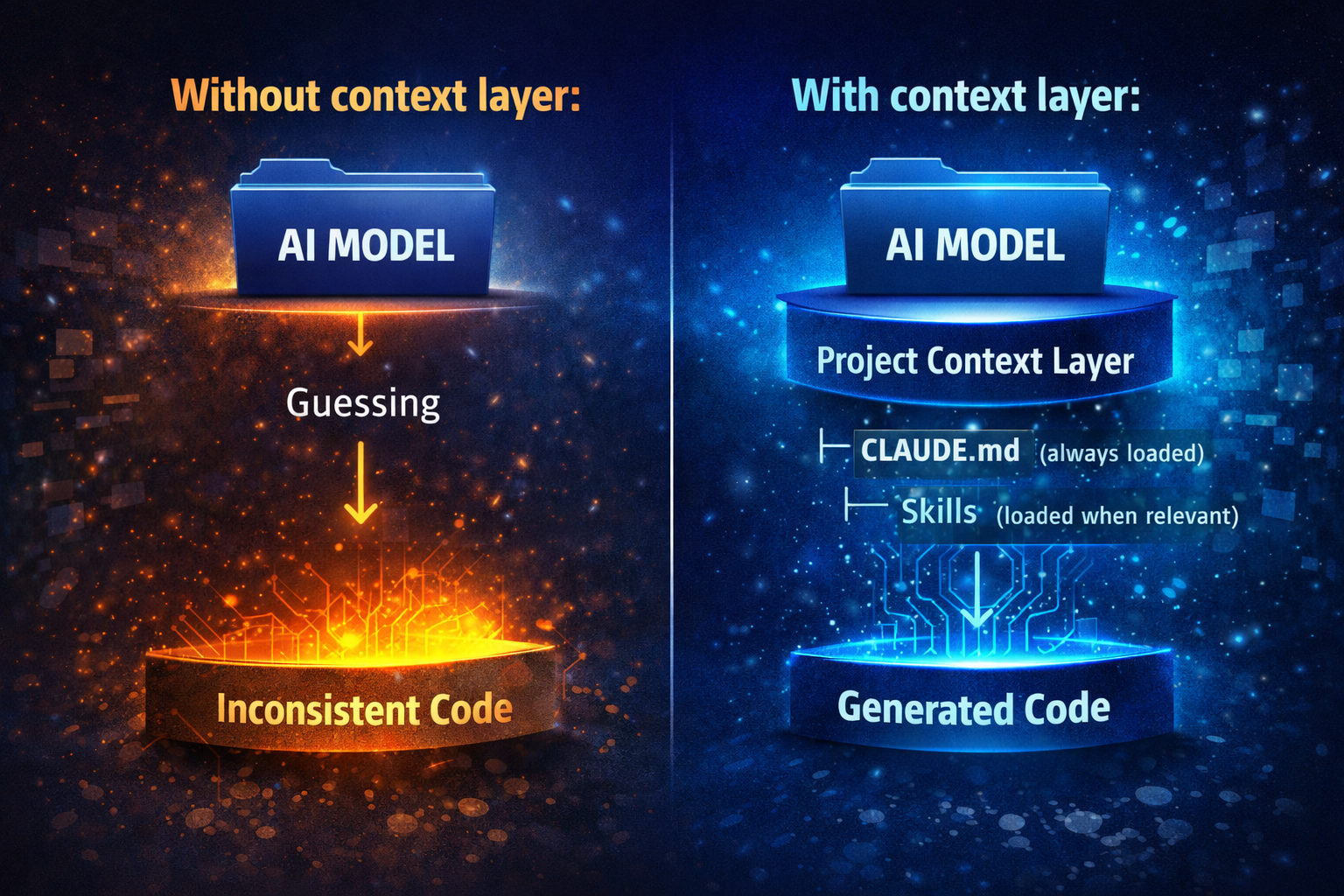
CLAUDE.md is always on. Right for project-wide rules. Wrong for loading every possible rule into every task. When you’re building a settings screen you don’t need the full navigation scaffold in context. Putting everything in CLAUDE.md burns the context window on stuff that doesn’t apply.
Skills fix that. A Skill is a folder with a SKILL.md (I keep mine in .claude/skills/ — e.g. .claude/skills/store-manager/SKILL.md). Claude loads it when the situation matches — not before. The description is the routing rule:
description: Use when creating a new Zustand store slice or adding state to an existing one
Vague descriptions (“helps with backend”) don’t trigger when you need them. Specific ones do. The Skills I keep for React Native:
Navigation Skill — React Navigation v7 setup, typed params, stack and tab composition, NavigationContainerRef. Loads when you’re defining routes or adding a navigator.
Store Skill — Zustand slice shape, co-located selectors, loading/error pattern. Loads when you’re adding state.
API Skill — Axios base, interceptors, error envelope, env-based URL. Loads when you’re building or touching the service layer.
Screen Scaffold Skill — Exact file shape for a new screen: imports, props, component, StyleSheet at the bottom. Loads when you’re creating a new screen file.
Mental model:
What actually changes the outcome
You’re not fixing the model. You’re building the documentation layer the React Native ecosystem never standardized — and giving it a place to live.
People who struggle with Claude on React Native usually expected web-level accuracy and never built the context layer. They prompt, get plausible code, ship it, and hit the real issue on device. The frustration is real. The cause is structural: training data gap, not bad prompts or a bad tool. You have to close it yourself.
The people who get consistent results did one thing first: they wrote CLAUDE.md before they wrote feature code. Not a generic template. Their actual stack, their actual patterns — everything they’d tell a new teammate. That file is where they decided where the project would go. Everything after that was either aligned to it or fighting it. Skills load the right depth at the right time. A review habit that doesn’t stop at “it compiled”. But the lever is CLAUDE.md, and the moment is day one.
If you’re starting a new React Native project tomorrow, create CLAUDE.md before you run the first codegen. Before you scaffold the first screen. Lock in the stack, the list rule, the navigation pattern, the folder structure. The rest of the project will follow that file or it will contradict it. There’s no third option.
The context layer doesn’t remove the gap entirely. Heavy native UI — animations that need to feel right on a small screen, gesture-heavy flows — still needs someone who’s run the app on a real device. For the rest — screens, stores, navigation, API layer, file structure — it narrows the gap enough that the tool helps instead of fights you. Do it once. Do it first.