
A beginner-friendly deep dive into Micro Frontends — what they are, how they work, when to use them, and whether your e-commerce app actually needs one.
TL;DR
Micro Frontend (MF) is an architectural pattern that takes the idea of microservices and applies it to the frontend. Instead of building one giant monolithic frontend app, you break it into smaller, independently deployable apps — each owned by a separate team, using its own tech stack, and stitched together at runtime into a seamless user experience.
Key takeaways from this guide:
- Vertical split = one MF per page/route. Horizontal split = multiple MFs on the same page.
- Ways to implement: iframes, Webpack Module Federation, Single-SPA, or the Vercel multi-zones approach.
- Data sharing: Custom Events, shared state stores, props/callbacks, URL params, or a pub/sub event bus.
- Repo strategy: Monorepo (Nx/Turborepo) for shared tooling and consistency; Polyrepo for maximum team autonomy.
- Use MFs when: you have 3+ teams, large-scale apps, or need independent deployments. Don't use MFs when: you have a small team, a simple app, or tight cross-feature coupling.
- For e-commerce: MFs shine at scale (think Zalando, IKEA), but are overkill for small-to-mid-size stores.
1. What Actually Is a Micro Frontend?
Imagine you're building a large web application — say, an online banking platform. You have a dashboard, an accounts page, a payments section, a support chat, and a settings page. In a monolithic frontend, all of these live in one massive codebase. Every team commits to the same repo, every deployment ships everything at once, and a bug in the chat widget can block the release of a critical payments fix.
Micro Frontends flip this model on its head.
Instead of one giant app, you split the frontend into smaller, self-contained applications — each responsible for a specific business domain. The dashboard team builds and deploys the dashboard independently. The payments team owns the payments micro frontend. The chat team ships their widget on their own schedule. To the end user, it all looks like one cohesive application. Under the hood, it's a collection of independently built and deployed pieces.
The Core Principles
- Team Autonomy — Each team owns their slice of the UI end-to-end, from development to deployment.
- Independent Deployability — Ship your micro frontend without coordinating a release with every other team.
- Technology Agnostic — The dashboard can use React while the settings page uses Vue. Each team picks the best tool for their domain.
- Fault Isolation — If one micro frontend crashes, the others keep working.
- Smaller Codebases — Each MF is simpler, easier to understand, and faster to onboard new developers.
Who Uses Micro Frontends?
Some of the biggest names in tech have adopted this pattern:
- Spotify — Separate teams for the music player, playlists, social features, and podcasts.
- IKEA — Product catalog, shopping cart, checkout, and account management as separate apps.
- Zalando — Different teams handle each product category (men's wear, women's wear, shoes) using their preferred frameworks.
- Netflix — Different teams handle search, recommendations, the player, and user profiles.
- American Express — Pioneered MFs for their customer-facing apps since 2016 to solve scaling issues.
2. Types of Micro Frontends: Vertical vs. Horizontal Split
When you decide to go micro frontend, your first big architectural decision is: how do you split the UI? There are two fundamental approaches.
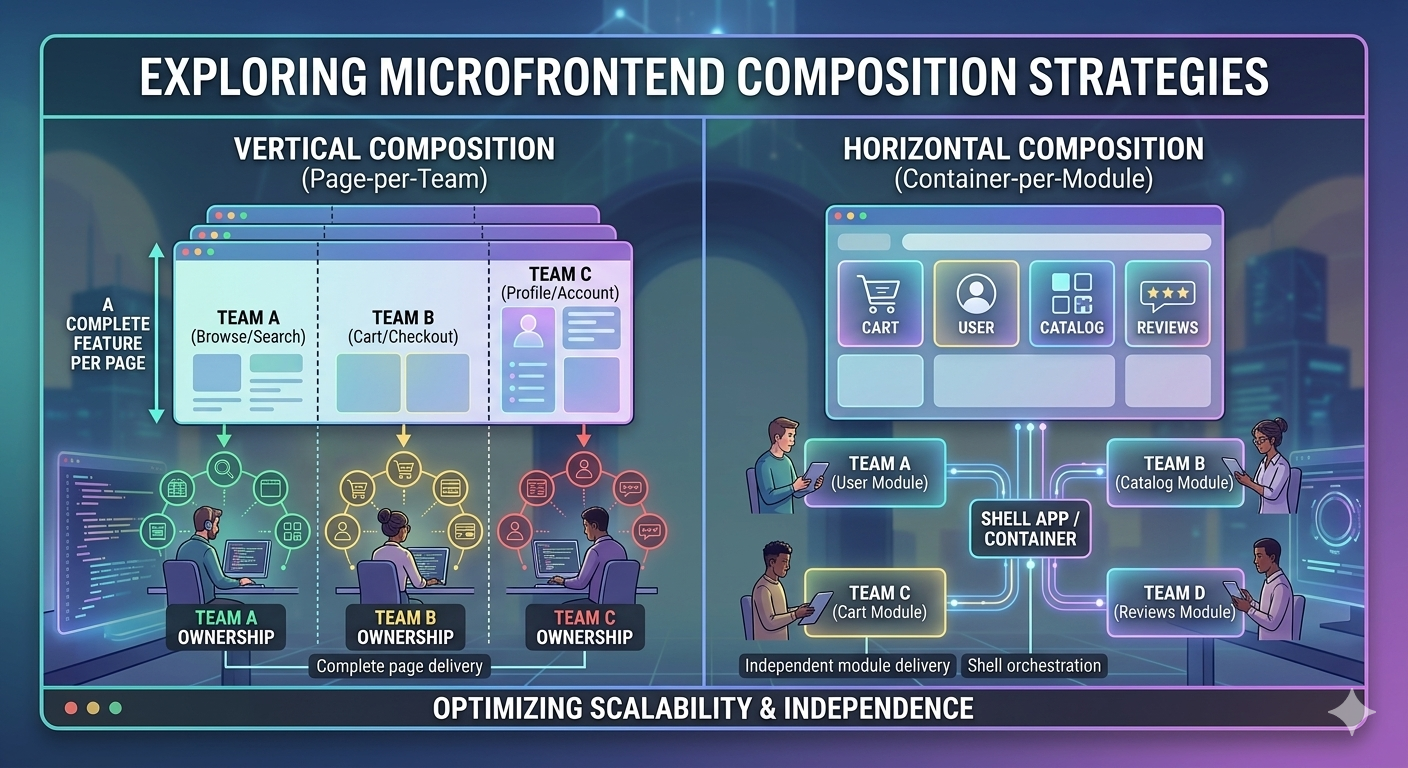
Vertical Split (Split by Route / Page)
In a vertical split, each micro frontend owns an entire page or route. When you navigate to /checkout, the checkout micro frontend loads and takes over the entire screen. When you go to /profile, a completely different micro frontend renders that page.
Think of it like separate apartments in a building — each one is self-contained with its own kitchen, bathroom, and living room. You walk into one apartment at a time.
How it works:
- A shell application (the "app shell") handles top-level routing.
- Based on the URL path, it loads the appropriate micro frontend.
- Each MF manages its own internal routing (e.g.,
/checkout/shipping,/checkout/payment).
When to use vertical split:
- One team owns a complete business domain (e.g., checkout, profile, catalog).
- You want UI consistency within each section.
- You're migrating a monolith incrementally — extract one section at a time.
- You want the simplest MF architecture to start with.
Real-world example: Vercel adopted vertical micro frontends for their own website. Their marketing site and the logged-in dashboard became separate MF apps, leading to a 40%+ improvement in build times and better Core Web Vitals.
Horizontal Split (Split by Component / Feature)
In a horizontal split, multiple micro frontends coexist on the same page. Different teams own different parts of the same screen. For example, on a product detail page: Team A owns the product info section, Team B owns the reviews widget, and Team C owns the "recommended items" carousel.
Think of it like an open-plan office — different teams sit in different zones of the same floor, working on their own things but sharing the same space.
How it works:
- A container/shell app defines the page layout.
- Placeholder slots are filled with micro frontends loaded at runtime.
- Each MF renders inside its designated area on the page.
When to use horizontal split:
- Multiple teams need to contribute to the same page.
- You have reusable components (header, footer, chat widget) shared across pages.
- You need maximum flexibility in composing UIs from independent pieces.
The tradeoff: Horizontal splits are more complex. You need to manage communication between MFs on the same page, ensure consistent styling, and handle the orchestration layer carefully. Vertical splits are simpler and closer to the traditional SPA developer experience.
Can You Mix Both?
Absolutely. Many real-world architectures use a vertical split at the route level with horizontal composition within certain pages. For instance, /checkout might be its own vertical MF, but the product listing page might horizontally compose a catalog MF, a search MF, and a recommendations MF.
3. Ways to Create Micro Frontends
There's no single "right" way to implement micro frontends. Here are the four most popular approaches, each with their own strengths and tradeoffs.
3.1 iframes
The oldest and simplest approach. Each micro frontend loads inside an <iframe> tag, running in its own completely isolated browser context.
<!-- Shell app -->
<div id="app-shell">
  <nav><!-- shared navigation --></nav>
  <iframe src="https://checkout.myapp.com" id="checkout-mf"></iframe>
</div>
Pros:
- Complete isolation — CSS, JavaScript, and DOM are fully sandboxed. Zero style leakage.
- Technology agnostic — Each iframe can run anything: React, Angular, Vue, or even a WordPress page.
- Simple to implement — No special tooling required.
Cons:
- Communication is painful — You're limited to
postMessageAPI for cross-iframe communication. - Performance overhead — Each iframe is essentially a separate browser page with its own rendering pipeline.
- No shared resources — Common libraries (React, design system) must be loaded separately in each iframe, bloating bundle size.
- Accessibility & SEO challenges — Screen readers and search engines struggle with iframe-based architectures.
- Responsive design is tricky — iframes don't naturally adapt to content height changes.
Best for: Embedding legacy applications into a modern shell, or situations where you need absolute isolation (e.g., third-party widgets).
3.2 Webpack Module Federation
Introduced in Webpack 5, Module Federation is the most popular modern approach to micro frontends. It allows independently built and deployed applications to share code at runtime — including components, hooks, utilities, and even entire pages.
How it works:
- A host (shell) application declares which remote modules it wants to consume.
- Each remote (micro frontend) exposes specific modules in its Webpack config.
- At runtime, the host fetches a
remoteEntry.jsmanifest from each remote and dynamically loads the exposed modules.
// Remote's webpack.config.js (e.g., Checkout MF)
new ModuleFederationPlugin({
  name: 'checkout',
  filename: 'remoteEntry.js',
  exposes: {
    './CheckoutPage': './src/CheckoutPage',
  },
  shared: ['react', 'react-dom'],
});

// Host's webpack.config.js (Shell App)
new ModuleFederationPlugin({
  name: 'shell',
  remotes: {
    checkout: 'checkout@https://checkout.myapp.com/remoteEntry.js',
  },
  shared: ['react', 'react-dom'],
});
// In the shell app — consuming the remote
const CheckoutPage = React.lazy(() => import('checkout/CheckoutPage'));

function App() {
  return (
    <Suspense fallback={<Loading />}>
      <CheckoutPage />
    </Suspense>
  );
}
Pros:
- Runtime code sharing — Share libraries (React, design system) without bundling them multiple times.
- Independent deployment — Each MF deploys its own
remoteEntry.js. No need to rebuild the shell. - Framework-flexible — While it works best within the same framework, you can federate across different frameworks.
- Fine-grained sharing — Expose individual components, not just entire apps.
Cons:
- Webpack-specific (though Vite plugins now exist for federation compatibility).
- Versioning complexity — Shared dependency version mismatches can cause subtle runtime errors.
- Debugging can be harder — Errors in remote modules can be tricky to trace.
Best for: Teams already using Webpack that want runtime code sharing with independent deployments. This is the go-to choice for many production MF setups in 2025-2026.
3.3 Single-SPA
Single-SPA is a meta-framework that orchestrates multiple single-page applications on the same page. It acts as a router and lifecycle manager: it decides which MF to mount, unmount, or update based on the current URL.
How it works:
- A root config (the orchestrator) registers each micro frontend with an "activity function" — a predicate that returns
truewhen the MF should be active. - Each MF implements lifecycle hooks:
bootstrap,mount, andunmount. - Single-SPA handles the transitions between MFs as the user navigates.
// Root config
import { registerApplication, start } from 'single-spa';

registerApplication({
  name: '@myapp/navbar',
  app: () => System.import('@myapp/navbar'),
  activeWhen: '/',  // Always active
});

registerApplication({
  name: '@myapp/checkout',
  app: () => System.import('@myapp/checkout'),
  activeWhen: '/checkout',  // Only on /checkout routes
});

start();
Pros:
- Framework agnostic — Mix React, Vue, Angular, and Svelte on the same page. Single-SPA provides adapter libraries for each.
- Proven at scale — Used by large organizations with heterogeneous tech stacks.
- Supports both vertical and horizontal splits.
- Active ecosystem — Tools like
import-map-overridesfor local development.
Cons:
- Learning curve — The lifecycle hooks and SystemJS imports can be confusing for newcomers.
- No built-in code sharing — Unlike Module Federation, Single-SPA doesn't natively share dependencies at runtime. You need to pair it with import maps or Module Federation.
- CSS isolation is your responsibility.
Best for: Organizations migrating from a monolith where different parts use different frameworks, or teams that need to run React alongside Angular.
3.4 The Vercel Way (Multi-Zones)
Vercel's approach to micro frontends is elegant in its simplicity. Called Multi-Zones, it leverages Next.js and Vercel's routing infrastructure to compose multiple independent Next.js apps under a single domain.
How it works:
- Each micro frontend is a standalone Next.js application deployed to Vercel.
- A rewrites configuration in the main app routes specific paths to different MF apps.
- From the user's perspective, it's one website. Under the hood, different paths are served by different apps.
// next.config.js of the main app (shell)
module.exports = {
  async rewrites() {
    return [
      {
        source: '/blog/:path*',
        destination: 'https://blog.myapp.com/:path*',
      },
      {
        source: '/docs/:path*',
        destination: 'https://docs.myapp.com/:path*',
      },
    ];
  },
};
Pros:
- Dead simple — No special tooling, no runtime orchestration. Just Next.js rewrites.
- Full SSR/SSG support — Each MF gets all the benefits of Next.js (server-side rendering, static generation, ISR).
- Great DX — Each team just works on a normal Next.js app. No MF-specific concepts to learn.
- Performance — No shared runtime overhead. Each app is optimized independently.
Cons:
- Vercel/Next.js specific — Tightly coupled to the Next.js ecosystem and Vercel platform.
- Vertical split only — This approach works at the route level. You can't horizontally compose MFs on the same page.
- Hard navigations between zones — Navigating from one MF to another triggers a full page load (though prefetching and Speculation Rules API can mitigate this).
Best for: Teams already on Next.js + Vercel that want the simplest possible MF setup with excellent performance and SEO.
Quick Comparison Table
| Approach | Isolation | Code Sharing | Framework Agnostic | Complexity | SSR Support |
|---|---|---|---|---|---|
| iframes | Complete | None | Yes | Low | No |
| Module Federation | Partial | Excellent | Partial | Medium | Limited |
| Single-SPA | Partial | Manual | Yes | High | Limited |
| Vercel Multi-Zones | Complete | Via packages | No (Next.js only) | Low | Excellent |
4. How to Pass Data Between Different Micro Frontend Apps
Communication between micro frontends is one of the trickiest aspects of the architecture. The golden rule is: keep it minimal. If two MFs are constantly passing state back and forth, they might be better off as a single app.
That said, some communication is inevitable. Here are the main approaches:
4.1 Custom Browser Events
The simplest and most decoupled approach. One MF dispatches a CustomEvent on the window object, and other MFs listen for it.
// Publisher (Catalog MF) — dispatching an event
const event = new CustomEvent('product:addedToCart', {
  detail: { productId: 'abc123', quantity: 1 }
});
window.dispatchEvent(event);

// Subscriber (Cart MF) — listening for events
window.addEventListener('product:addedToCart', (e) => {
  console.log('Product added:', e.detail);
  updateCartCount(e.detail);
});
When to use: Loosely coupled, fire-and-forget communication. Great for notifications like "item added to cart" or "user logged in."
Watch out for: Event naming conflicts, no guaranteed delivery order, and subscribers must be mounted before events fire.
4.2 Pub/Sub Event Bus
Similar to custom events, but you build (or use) a dedicated message bus library with publish, subscribe, and unsubscribe methods. This gives you more control than raw browser events.
// Shared event bus (passed by the shell or loaded as a shared module)
class EventBus {
  constructor() { this.events = {}; }

  subscribe(event, callback) {
    this.events[event] = this.events[event] || [];
    this.events[event].push(callback);
    return () => {
      this.events[event] = this.events[event].filter(cb => cb !== callback);
    };
  }

  publish(event, data) {
    (this.events[event] || []).forEach(cb => cb(data));
  }
}

// The shell creates and shares a single instance
window.__EVENT_BUS__ = new EventBus();
When to use: When you need more structured communication than raw events — like replaying the last event for late-mounting MFs, or when building for mobile MFs where browser custom events don't exist.
4.3 Props and Callbacks (Build-Time Integration)
If your MFs are integrated at build time (e.g., as npm packages or Module Federation modules), the shell can pass data and callbacks as props, just like regular React components.
// Shell app passing data to a micro frontend component
<CartMicroFrontend
  userId={currentUser.id}
  onCheckout={(items) => navigateTo('/checkout', { items })}
/>
When to use: When MFs are tightly integrated into the shell's component tree. This is the most "React-like" approach and works well with Module Federation.
Watch out for: Creates coupling between the shell and the MF's prop interface.
4.4 URL / Query Parameters
The simplest form of state sharing. Encode shared state in the URL itself.
https://myapp.com/products?category=electronics&sort=price-asc
Each MF reads from the URL and reacts accordingly. The product list MF reads category and sort. The breadcrumb MF reads category to display the trail.
When to use: For state that should be shareable and bookmarkable — filters, search queries, pagination. This is especially natural with vertical splits where each MF owns a route.
4.5 Shared State Store
For scenarios requiring real-time synchronization between MFs on the same page, you can use a shared state management solution — either a lightweight custom store or a library exposed via Module Federation.
// Shared store exposed via Module Federation
import { create } from 'zustand';

export const useSharedStore = create((set) => ({
  cartItems: [],
  addToCart: (item) => set((state) => ({
    cartItems: [...state.cartItems, item]
  })),
}));
When to use: Horizontal splits where multiple MFs on the same page need to stay in sync. Use sparingly — a shared store creates coupling.
4.6 Web Storage (localStorage / sessionStorage)
Store shared data in the browser's storage. MFs read from it as needed. You can combine this with a storage event listener for cross-tab reactivity.
When to use: Persisting session tokens, user preferences, or non-sensitive data like theme settings. Works only when MFs are on the same origin.
Choosing the Right Communication Method
| Method | Coupling | Complexity | Best For |
|---|---|---|---|
| Custom Events | Very Low | Low | Fire-and-forget notifications |
| Event Bus | Low | Medium | Structured, bidirectional messaging |
| Props/Callbacks | Medium | Low | Build-time integrated MFs |
| URL Params | Very Low | Very Low | Shareable, bookmarkable state |
| Shared Store | High | Medium | Real-time sync on same page |
| Web Storage | Low | Low | Persisted settings, tokens |
5. Micro Frontends with Monorepo vs. Polyrepo
Your repository structure profoundly shapes how teams collaborate, share code, and deploy. With micro frontends, you have two main options.
Monorepo: All MFs in One Repository
A monorepo houses all your micro frontends (and shared libraries) in a single Git repository. Tools like Nx, Turborepo, or Lerna manage the complexity.
Typical folder structure:
my-app/
├── apps/
│   ├── shell/              # The container/host app
│   ├── checkout/           # Checkout micro frontend
│   ├── catalog/            # Catalog micro frontend
│   └── profile/            # Profile micro frontend
├── packages/
│   ├── design-system/      # Shared UI components
│   ├── utils/              # Shared utility functions
│   ├── api-client/         # Shared API layer
│   └── event-bus/          # Shared communication layer
├── tools/
│   └── webpack-config/     # Shared build configuration
├── nx.json / turbo.json
├── package.json
└── tsconfig.base.json
Why choose monorepo:
- Code sharing is trivial — Import a shared component with a simple path alias. No publishing npm packages.
- Atomic commits — A change to the design system and the MFs that use it can land in a single PR.
- Consistent tooling — One ESLint config, one TypeScript setup, one CI pipeline.
- Easier refactoring — Rename a shared utility and see all usages immediately.
- Dependency management — A single version policy prevents "works on my MF, breaks on yours" issues.
The challenges:
- Build times can grow as the repo grows (mitigated by Nx/Turborepo caching and affected-only builds).
- All teams must agree on tooling, folder structure, and code standards.
- Repository size can become unwieldy without proper tooling.
Who uses this: Google (with Bazel), Vercel (for their own MF setup), many enterprise teams.
Polyrepo: Separate Repository Per MF
Each micro frontend lives in its own Git repository with its own CI/CD pipeline, dependencies, and release cycle.
Typical structure:
# Separate repos:
github.com/myorg/shell-app
github.com/myorg/checkout-mf
github.com/myorg/catalog-mf
github.com/myorg/profile-mf
github.com/myorg/design-system    # Published as npm package
github.com/myorg/shared-utils     # Published as npm package
Why choose polyrepo:
- Maximum team autonomy — Each team controls their own repo, CI/CD, tech stack, and release schedule.
- Clear ownership boundaries — No ambiguity about who owns what code.
- Independent scaling — Repos stay small and fast regardless of how many MFs you have.
- Flexible access control — Easy to grant/restrict access per repo.
The challenges:
- Sharing code requires publishing npm packages and managing versions across repos.
- Cross-cutting changes (e.g., updating a shared library) require coordinated PRs across multiple repos.
- Harder to maintain consistency in linting, testing, and build configurations.
- Integration testing is complex — you need to spin up multiple MFs together.
Who uses this: Netflix, Spotify, organizations with highly autonomous teams.
Decision Guide
| Factor | Monorepo | Polyrepo |
|---|---|---|
| Team count | 2-5 teams | 5+ highly autonomous teams |
| Code sharing needs | High | Low to Medium |
| Deployment independence | Medium (needs good tooling) | High |
| Consistency requirements | High | Lower |
| Onboarding ease | Easier (one repo to clone) | Harder (many repos to discover) |
| Tooling investment | Nx/Turborepo setup | npm registry + coordination scripts |
The pragmatic take: Start with a monorepo if you're just adopting micro frontends. It's easier to split a monorepo into polyrepos later than to merge polyrepos into a monorepo.
6. When Should You Use Micro Frontends (and When Shouldn't You)?
Micro frontends are not a silver bullet. They solve specific organizational and scaling problems, but they introduce real complexity. Here's when they make sense — and when they don't.
Use Micro Frontends When...
- You have 3+ teams working on the same frontend product, and coordination is becoming a bottleneck.
- Your codebase has grown past 50+ components and is becoming hard to maintain, test, and deploy.
- Different sections need different deployment frequencies — the marketing pages ship weekly, but the checkout flow ships daily.
- You're migrating a legacy monolith — MFs let you extract sections one at a time without a big-bang rewrite.
- You need technology diversity — maybe one team is on React and another has an Angular legacy they can't rewrite yet.
- Independent scaling is important — during a sale event, the product catalog needs to scale, but the settings page doesn't.
- You want fault isolation — a bug in the recommendations engine shouldn't crash the checkout flow.
Don't Use Micro Frontends When...
- You have a small team (1-2 developers) — the overhead of MF infrastructure will dwarf the benefits.
- Your app is simple — a blog, a landing page, or a basic CRUD app doesn't need this complexity.
- Your pages are tightly coupled — if features constantly need to share state and interact deeply, splitting them into MFs creates more problems than it solves.
- You can't invest in platform tooling — MFs need a "platform team" or at least dedicated effort for the shell, shared libraries, CI/CD, and developer experience.
- Performance is your top priority and bundle size matters — MFs can increase total JavaScript payload if dependency sharing isn't done carefully.
- SEO is critical and you're not using SSR — client-side composed MFs can hurt crawlability.
The Litmus Test
Ask yourself these three questions:
- Is our biggest pain point organizational (teams stepping on each other) or technical (code is messy)? If it's organizational → MFs might help. If it's technical → clean up the monolith first.
- Can we afford a platform team or at least dedicated time for MF infrastructure? If no → don't do it.
- Are our business domains loosely coupled? If yes → MFs work well. If no → a well-structured monolith is simpler.
7. Tradeoffs: Regular Frontend vs. Micro Frontend Architecture
Let's be honest about what you gain and what you give up.
What You Gain with Micro Frontends
| Benefit | Details |
|---|---|
| Independent deployments | Ship features without waiting for other teams. Reduces release risk and increases velocity. |
| Team autonomy | Each team owns their domain end-to-end. Faster decisions, clearer ownership. |
| Technology flexibility | Choose the best tool per domain. Migrate frameworks incrementally. |
| Fault isolation | One MF failing doesn't take down the whole app. |
| Smaller codebases | Easier to understand, test, and onboard new developers. |
| Scalable development | Add more teams without them blocking each other. |
What You Give Up (The Hidden Costs)
| Cost | Details |
|---|---|
| Increased complexity | You now have a distributed system on the frontend. Orchestration, routing, and communication add layers. |
| Larger bundle sizes | Without careful dependency sharing, users may download React multiple times. |
| UX consistency challenges | Different teams must align on design systems, animations, and interaction patterns. |
| Debugging is harder | Tracing a bug across MF boundaries requires observability tooling. |
| Testing complexity | Unit testing is fine, but integration and E2E testing across MFs is significantly harder. |
| Operational overhead | More CI/CD pipelines, more deployments to monitor, more infrastructure to maintain. |
| Performance gotchas | Hard navigations between vertical MFs, extra network requests for remote entries, potential layout shifts during lazy loading. |
The Bottom Line
A regular monolithic frontend is simpler, faster to set up, and sufficient for most applications. Micro frontends are a scaling pattern — they trade simplicity for organizational scalability. Don't adopt them to solve a technical problem. Adopt them when your organizational structure demands it.
A useful mental model: Micro frontends solve people problems, not code problems. If your codebase is messy, breaking it into multiple messy micro frontends won't help. Clean architecture within each MF is still essential.
8. Should I Use Micro Frontends for My E-Commerce App?
This is one of the most common questions, and the answer depends entirely on your scale and team structure. Let's break it down.
When MFs Make Sense for E-Commerce
E-commerce platforms often have naturally distinct business domains that map well to micro frontends:
- Product Catalog — browsing, search, filtering, product detail pages
- Shopping Cart — cart management, pricing, promotions
- Checkout — shipping, payment, order confirmation
- User Account — profile, order history, saved addresses
- Content/CMS — blog, marketing pages, landing pages
- Recommendations — personalized suggestions, "frequently bought together"
If you have separate teams owning each of these domains and they're stepping on each other's toes in a monolith — yes, micro frontends can dramatically improve velocity. Zalando, one of Europe's largest e-commerce platforms, has openly documented their success with MFs. IKEA uses a similar approach with separate teams for catalog, cart, checkout, and accounts.
When MFs Are Overkill for E-Commerce
If you're a small-to-mid-size e-commerce business with:
- 1-3 frontend developers
- A single team building the whole storefront
- A platform like Shopify, WooCommerce, or a single Next.js app handling everything
- Revenue under $10M/year (rough heuristic — it's really about team size)
...then micro frontends add complexity you don't need. You're better off with a well-structured monolithic Next.js or Remix app with clean code boundaries, a good component library, and solid deployment practices.
The Decision Matrix for E-Commerce
| Scenario | Recommendation |
|---|---|
| Solo dev or small team (1-5 devs), single storefront | Don't use MFs. A clean monolith is far simpler. |
| Mid-size team (5-15 devs), growing product | Consider MFs if deployment bottlenecks or team conflicts are emerging. Start with a vertical split. |
| Large team (15+ devs), multi-brand or multi-market | Use MFs. The organizational benefits are significant. Monorepo with Module Federation is a solid starting point. |
| Migrating from legacy (e.g., old Angular or jQuery storefront) | Use MFs for incremental migration. Wrap legacy sections while building new features in a modern framework. |
| Headless commerce with composable architecture | MFs fit naturally. Each commerce capability (PIM, OMS, CMS) can have its own frontend module. |
| Marketplace with multiple vendor interfaces | Strong MF candidate. Vendor dashboard, buyer experience, admin panel, and seller tools are cleanly separable. |
Practical Tips If You Go MF for E-Commerce
- Start with a vertical split by page — Catalog, Checkout, and Account as separate MFs are a natural first step.
- Invest in a shared design system early — Consistent styling across MFs is critical for e-commerce UX.
- Keep the cart state centralized — The cart is cross-cutting. Use a shared API-backed state or an event bus, not local MF state.
- Use Module Federation for shared dependencies — Don't ship React three times on a product page.
- Monitor Core Web Vitals per MF — E-commerce conversion rates are directly tied to performance. Track LCP, INP, and CLS for each micro frontend.
- Don't over-split — A "header MF," "footer MF," and "breadcrumb MF" is going too far. Split by business domain, not by UI element.
Final Thoughts
Micro frontends are a powerful architectural pattern — but they're not for everyone. They solve real organizational scaling challenges at the cost of increased technical complexity. The best micro frontend architectures are the ones you don't notice as a user: the experience is seamless, the performance is solid, and the teams behind them ship independently with confidence.
If you're just starting out: master the monolith first. Understand clean architecture, component design, and state management within a single app. Then, when your organization truly outgrows it, micro frontends will be there waiting — and you'll adopt them for the right reasons.