
Most Claude Code setups connect to external tools through MCP servers. Slack, Vercel, Figma, ClickUp. Each one gets its own server, and Claude can call any of its tools at any time. It works.
The problem is what it costs before you type anything.
What an MCP server actually puts in your context
MCP uses JSON-RPC. When Claude Code starts, it calls tools/list on every connected server. The server replies with every tool it offers: the name, a description, and the full JSON Schema for every input parameter. Claude needs all of that to know what it can call and how.
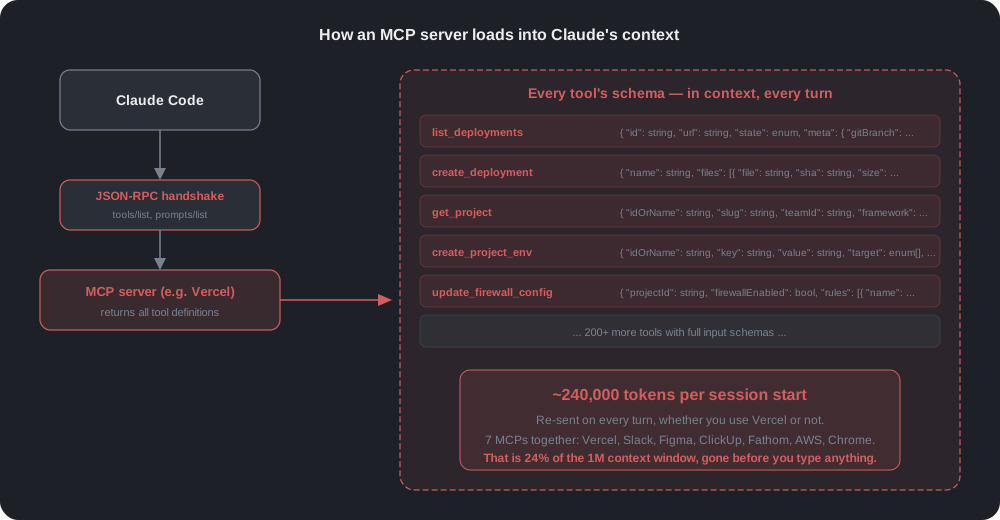
Vercel alone has over 200 tools. Each tool carries a schema with nested objects, enums, and descriptions. That single server puts roughly 94,000 tokens into the context. Slack adds 54,000. Figma adds 43,000. ClickUp, Fathom, AWS, Chrome DevTools: by the time all seven are connected, the context starts at about 240,000 tokens.
That is 24% of the 1M context window, used up before you ask a single question.
It compounds from there. This block is re-sent on every turn. Ask Claude to fix a typo in a README, and those 240,000 tokens ride along with the request. They are part of every API call for the rest of the session, billed as input tokens every time.
What we actually use per session
We tracked it for a month across our team. A typical session touches one or two of these tools. A Vercel deploy check. A Slack message. A Figma frame export. Nobody uses all seven in one session, yet all seven load every time.
- Loaded every session. ~240,000 tokens of tool schemas.
- Actually used per session. One or two tools, maybe 3,000 to 5,000 tokens of relevant instructions.
The replacement: connectors that load on demand
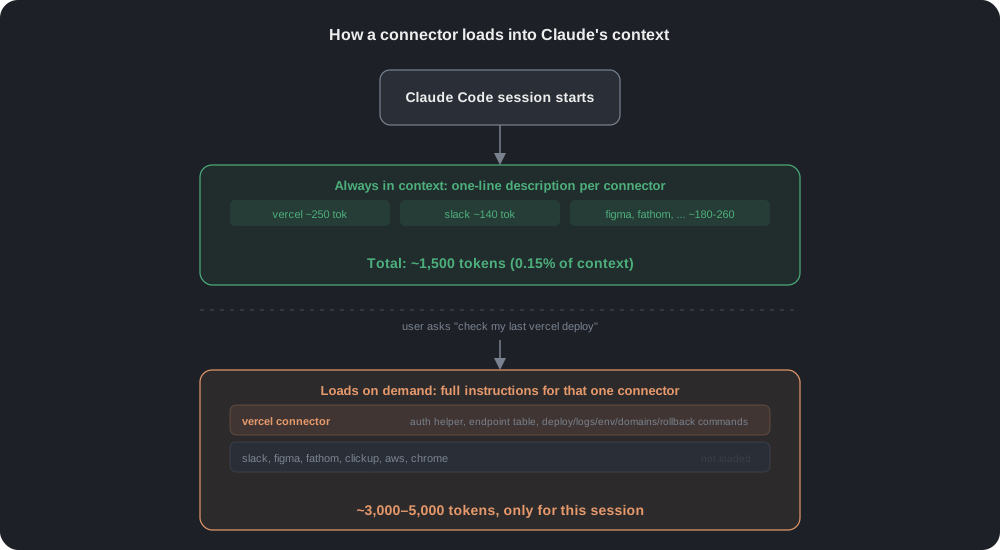
We wrote a lightweight connector for each app. Each connector keeps only a one-line description in context at session start. The full instructions (auth setup, API endpoints, curl helpers, gotchas) load only when Claude actually needs that app.
The connectors call the same REST APIs the MCP servers called internally, written as curl instead of routed through JSON-RPC.
How a connector works
A connector is a single file of instructions. It holds the curl commands for one app's REST API: the auth header, a small helper function, and a table of the endpoints we use, plus the quirks we hit along the way. When a task needs that app, Claude reads the file and runs the curl commands from it.
There is no server to run and no schema to register. The file is the whole connector, and it is only read when the task calls for it.
The numbers
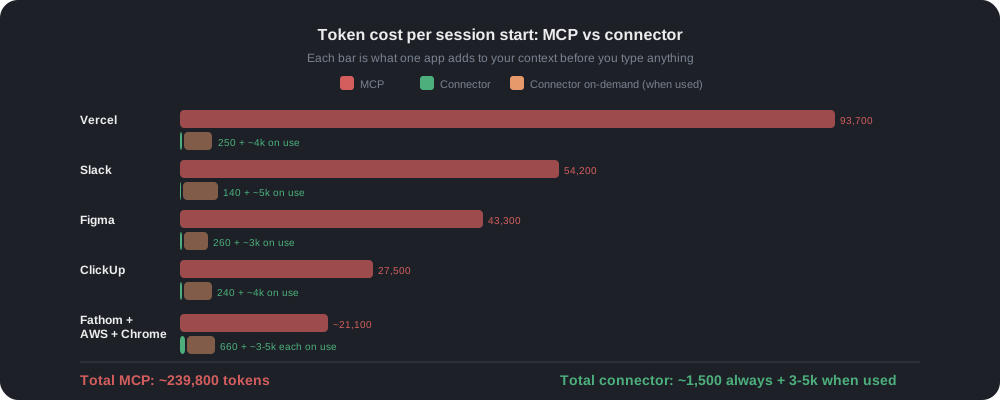
| App | MCP tokens | Connector (always) | Connector (on use) |
|---|---|---|---|
| Vercel | 93,700 | ~250 | ~4,000 |
| Slack | 54,200 | ~140 | ~5,000 |
| Figma | 43,300 | ~260 | ~3,000 |
| ClickUp | 27,500 | ~240 | ~4,000 |
| Fathom | ~8,000 | ~250 | ~3,500 |
| AWS | ~7,500 | ~230 | ~4,500 |
| Chrome DevTools | ~5,600 | ~180 | ~3,000 |
| Total | ~239,800 | ~1,500 | 3,000–5,000 per app |
The always-on context dropped from ~240,000 to ~1,500 tokens. That is 184 times smaller, or 0.15% of the context window instead of 24%.
When you actually use an app, its full instructions load for that session. A session that checks a Vercel deploy and reads a Slack channel uses about 1,500 + 4,000 + 5,000 = 10,500 tokens. Still 23 times less than the MCP baseline of 240,000.
How auth works without an MCP server
Each MCP server handles its own authentication. Without them, the connectors need to do it themselves. We store every token in the macOS Keychain and retrieve it at call time.
- Vercel, Figma, Fathom, ClickUp. Claude opens the token page in the browser, asks you to paste the personal access token, tests it with a curl call, and saves it to the Keychain only if it works.
- Slack. A built-in script reads your existing signed-in session from Chrome or the Slack desktop app. It extracts the session token, checks it, and saves it. You never copy a token. macOS may ask to allow Keychain access.
- AWS. Uses your existing
awsCLI profiles and SSO login. No token to save.
First-run setup happens automatically the first time you use each connector. After that, it works until a token expires.
How to install
The plugin is open source. Three commands inside Claude Code:
/plugin marketplace add prathambhatia/custom-connectors
/plugin install custom-connectors@custom-connectors
/reload-plugins
Connectors show as custom-connectors:slack, custom-connectors:vercel, custom-connectors:figma, and so on. Each one replaces the corresponding MCP.
Source: github.com/prathambhatia/custom-connectors
The real cost is the context you don't see
The token numbers from MCP servers are easy to miss. Nobody shows you a "240,000 tokens loaded" banner at session start. The tools work, so there is no error to investigate. The cost shows up as a faster context fill, earlier compactions, and a higher bill at the end of the month.
Once we measured it, the fix took a weekend. Same APIs, same auth, same results, loaded when needed instead of always.