TL;DR
- We built a RAG system to search 200+ enterprise policy documents organized across multiple volumes and categories
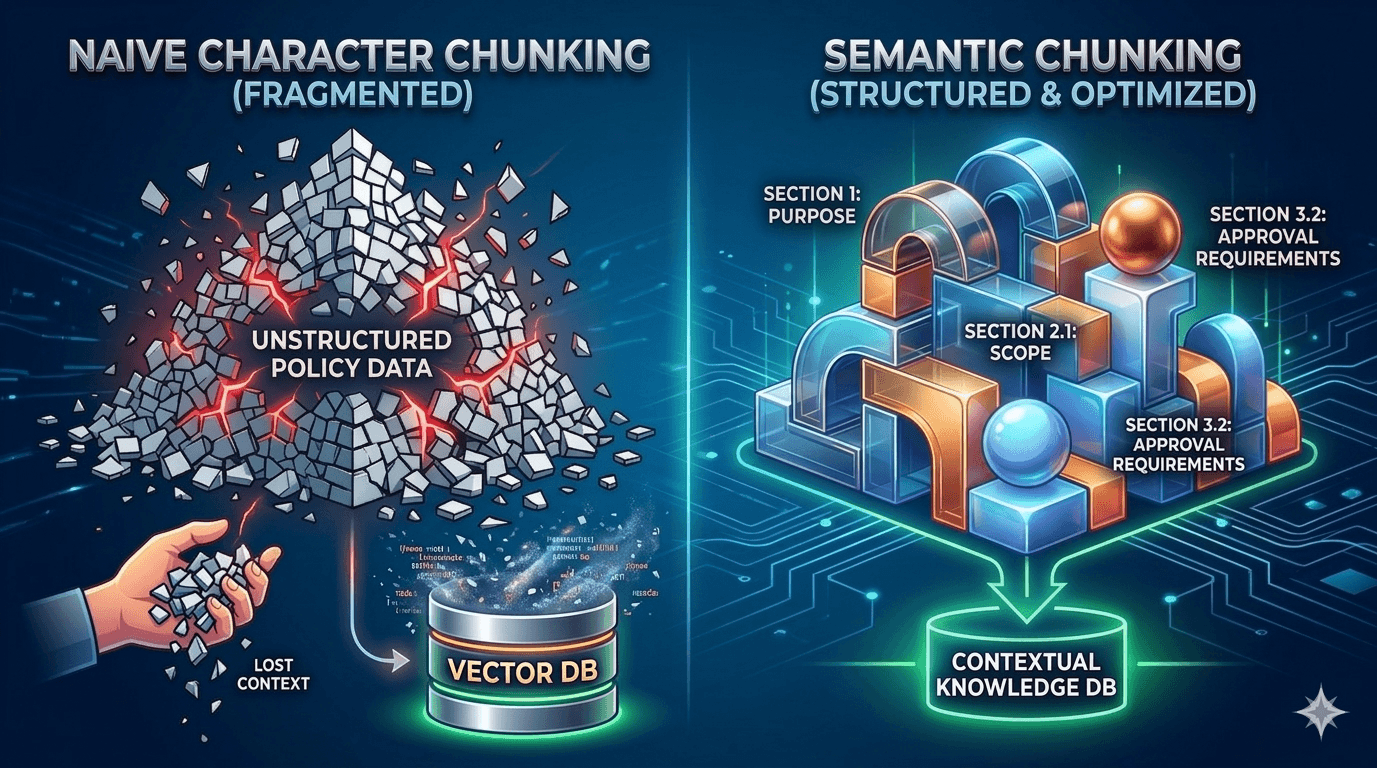
- Naive character-based chunking (1500 chars, 200 overlap) split approval requirements mid-sentence, mixed unrelated sections, and destroyed retrieval quality
- We replaced it with a semantic chunker that detects section boundaries using 6 header patterns (Word styles, numbered sections, ALL CAPS, colon-terminated, lettered, bold)
- Chunks now respect document structure: "Section 4.2 Approval Requirements" stays intact instead of getting sliced at character 1500
- Combined with hybrid search (0.7 vector + 0.3 BM25 via Reciprocal Rank Fusion), retrieval accuracy improved enough that our LLM stopped hallucinating approvers from wrong policy sections
The system we were building
One engineer, Claude Code as the pair programmer, three weeks, 200+ policy documents totaling roughly 500,000 words. We were prototyping an AI-powered policy decision engine for an enterprise client. The idea: someone submits a request like "I need to hire a contractor for $50,000," the system finds the relevant policies, and determines who needs to approve it.
The stack: FastAPI, ChromaDB with cosine similarity, OpenAI text-embedding-3-large for embeddings, and GPT-4 Turbo for decision-making. The policies lived as DOCX files organized into multiple volumes covering everything from procurement thresholds to regional labor law to IT security.
The retrieval pipeline worked in three stages: first, SQL-based policy narrowing reduced 200 policies to ~50 candidates using category and jurisdiction matching. Then, vector search with an optional BM25 hybrid found the top 10 most relevant chunks. Finally, GPT-4 Turbo read those chunks and extracted the actual approval requirements.
The problem was stage two. Our chunks were garbage.
What character-based chunking actually does to structured documents
Our first approach was the textbook one. Split the document every 1500 characters with 200-character overlap. Find sentence boundaries when possible. Move on.
def chunk_text(text, chunk_size=1500, chunk_overlap=200):
    chunks = []
    start = 0
    while start < len(text):
        end = start + chunk_size
        if end < len(text):
            for sep in ['. ', '.\n', '?\n', '!\n', '\n\n']:
                last_sep = text.rfind(sep, start, end)
                if last_sep > start + chunk_overlap:
                    end = last_sep + len(sep)
                    break
        chunk_content = text[start:end].strip()
        if chunk_content:
            chunks.append(chunk_content)
        start = end - chunk_overlap
    return chunks
This works fine for blog posts and articles. It falls apart on structured enterprise documents. Here is exactly what happened to a procurement policy:
The Chunk Gap Problem
Chunk 7 (chars 9000-10498): "...3.2 Approval Requirements All procurement requests must follow the tiered approval process. The requesting department must submit Form PR-100 with full justification. Approval is required from the Department Head when the contract value exceeds"
--- CHARACTER BOUNDARY (1500 chars) ---
Chunk 8 (chars 10299-11797): "$25,000 USD. The Finance Manager must co-sign all procurement agreements above $100,000. For contracts involving international suppliers, Legal review is mandatory regardless of amount..."
Query: "Who approves a $50,000 contractor hire?" Retrieved: Chunk 7 only. LLM sees: "approval is required from the Department Head when the contract value exceeds" ... exceeds what? Result: LLM hallucinated "Department Head approval for all amounts" —missing the $25K threshold and Finance co-sign requirement entirely.
The approval threshold —the single most important piece of information in the entire document —got split across two chunks. The 200-character overlap did not save us here because the sentence boundary detector found a period at character 10498, 200 characters before the threshold value appeared.
Worse, the overlap meant chunks contained trailing context from the previous section. A chunk about "Supplier Qualification Criteria" would start with the last two sentences of "Payment Terms and Conditions." The embedding model dutifully encoded both topics into the vector, making the chunk a mediocre match for either query.
Why this matters more for policy documents than general text
Blog posts and documentation have a property that makes character-based chunking tolerable: adjacent paragraphs tend to discuss related topics. The semantic distance between paragraph 3 and paragraph 4 is usually small.
Policy documents are different. Section 3.1 might define approval thresholds in USD. Section 3.2 might cover exception handling for urgent requests. Section 4 might jump to audit trail requirements. These are semantically distinct topics that happen to be adjacent in the document. Merging them into a single chunk creates an embedding that represents the average of unrelated concepts —useful for none of them.
Enterprise policies also have a specific structural pattern that matters for retrieval:
- Numbered sections with hierarchy:
1. Purpose,2.1 Scope,3.2.1 Specific Requirements - Approval matrices that must stay intact: "Level 1: Department Head for $5K-$25K. Level 2: VP for $25K-$100K"
- Region-specific subsections: local labor law requirements nested under a global HR policy
- Cross-references: "Per Section 4.2 of PROC-CC-001" means nothing if Section 4.2 got split across chunks
What we evaluated before building our own
We did not start by writing a custom chunker. We looked at three existing options first.
LangChain's RecursiveCharacterTextSplitter was the first thing we tried. It splits by a hierarchy of separators (\n\n, \n, . , ) and falls back through the list until chunks fit under the size limit. The problem: it has no awareness of document structure. A \n\n in a policy document might separate two paragraphs within the same approval section, or it might separate "Approval Requirements" from "Audit Trail." The splitter treats both identically. For unstructured text this is fine. For our policies, it produced the same Chunk Gap problem as naive splitting.
LlamaIndex's SentenceSplitter was better because it respects sentence boundaries more carefully. But it still operates on flat text. It does not know that a bold line reading "Approval Requirements:" is a section header, or that "3.2" at the start of a line indicates a subsection. Our DOCX files carried rich formatting metadata (Word heading styles, bold runs) that a text-only splitter could not use.
Unstructured.io can parse DOCX files and extract elements (titles, narrative text, tables) with structural awareness. This was the closest to what we needed. We ruled it out for two reasons: it added a heavy dependency for what turned out to be a narrowly-scoped problem (our documents all followed similar formatting conventions), and its element classification did not always match our policy-specific header patterns (it missed colon-terminated headers like "Approval Requirements:" and lettered sections like "A. Overview" that were common in our document set).
So we built a chunker tailored to our documents. One engineer paired with Claude Code, under 300 lines of Python, about two days to write and tune.
How we built the semantic chunker
The core insight: instead of splitting at character boundaries, split at section boundaries. A "section" is defined by header patterns that we detect in the document.
Step 1: Detect section headers
We identify six types of headers, checked in priority order:
def _detect_header(self, para, text):
    # 1. Word heading styles (most reliable)
    style_name = para.style.name if para.style else ""
    if style_name.startswith('Heading'):
        level = int(style_name.split()[-1])
        return {'level': level, 'source': 'style'}

    # 2. Numbered sections: "1. Purpose", "2.1 Scope", "3.2.1 Requirements"
    numbered_match = re.match(r'^(\d+(?:\.\d+)*)\s+[A-Z]', text)
    if numbered_match:
        section_num = numbered_match.group(1)
        level = section_num.count('.') + 1
        return {'level': level, 'source': 'numbered'}

    # 3. Lettered sections: "A. Overview", "B. Definitions"
    if re.match(r'^[A-Z]\.\s+[A-Z]', text):
        return {'level': 1, 'source': 'lettered'}

    # 4. ALL CAPS headers (min 10 chars)
    if re.match(r'^[A-Z][A-Z\s]{9,}$', text) and text.isupper():
        return {'level': 1, 'source': 'caps'}

    # 5. Colon-terminated: "Approval Requirements:"
    if re.match(r'^[A-Z][^:\n]{10,50}:$', text):
        return {'level': 2, 'source': 'colon'}

    # 6. Bold formatting (short text, starts with capital)
    if para.runs and all(run.bold for run in para.runs if run.text.strip()):
        if len(text) < 100 and text[0].isupper():
            return {'level': 2, 'source': 'bold'}

    return None
The priority order matters. Word heading styles are the most reliable signal because the document author explicitly marked them as headings. Numbered sections are next because they are unambiguous. Bold formatting is last because it produces the most false positives —people bold random things.
The level field preserves hierarchy. 1. Purpose is level 1. 2.1 Scope is level 2 (one dot = depth 2). 3.2.1 Specific Requirements is level 3. This hierarchy information travels with the chunk into ChromaDB metadata, which we use later for context.
Step 2: Extract sections as semantic units
Once we can detect headers, we walk through the document and collect content between headers into PolicySection objects:
class PolicySection:
    title: str        # "3.2 Approval Requirements"
    content: str      # Everything until the next header
    level: int        # 2 (one dot in section number)
    section_number: str  # "3.2"
    start_char: int
    end_char: int
A document with 8 top-level sections and 20 subsections produces ~28 PolicySection objects. Each one is a semantically coherent unit: "Approval Requirements" contains all the approval requirements, not half of them.
Step 3: Convert sections to right-sized chunks
Sections vary wildly in length. "1. Purpose" might be 200 characters. "4. Detailed Requirements" might be 8000 characters. We need chunks that fit within embedding model token limits while respecting section boundaries.
A note on sizing: we target 1500 characters per chunk, which translates to roughly 375-500 tokens depending on content density. For text-embedding-3-large with its 8191-token limit, this means each chunk uses about 5% of the model's capacity. We deliberately stay well below the limit because embedding quality degrades on longer inputs —the model has to compress more information into the same vector dimension, and the representation becomes less precise. Shorter, focused chunks produce sharper embeddings.
The algorithm:
def chunk_sections(self, sections, policy_title=""):
    chunks = []
    pending_sections = []
    pending_size = 0

    for section in sections:
        section_text = f"{section.title}\n\n{section.content}"
        section_size = len(section_text)

        # Large section: split it (preserving paragraph boundaries)
        if section_size > self.max_chunk_size:
            # Flush pending small sections first
            if pending_sections:
                chunks.append(self._merge_sections(pending_sections))
                pending_sections = []
            # Split by paragraphs, then sentences if needed
            chunks.extend(self._split_large_section(section))

        # Adding this section would overflow: flush and start new group
        elif pending_size + section_size > self.max_chunk_size:
            chunks.append(self._merge_sections(pending_sections))
            pending_sections = [section]
            pending_size = section_size

        # Accumulate small sections together
        else:
            pending_sections.append(section)
            pending_size += section_size

    # Flush remaining
    if pending_sections:
        chunks.append(self._merge_sections(pending_sections))

    return chunks
Three key behaviors:
-
Small sections get merged. "1. Purpose" (150 chars) and "2. Scope" (300 chars) become one chunk. This avoids producing tiny chunks that waste embedding space and lack context.
-
Large sections get split at paragraph boundaries. If "4. Detailed Requirements" is 8000 characters, we split at
\n\nboundaries, keeping each sub-chunk under 1500 characters. Each sub-chunk retains the section header as a prefix so the embedding model knows the context. -
When paragraphs are still too large, we fall back to sentence splitting. This is the last resort. We split at
.boundaries, and each sub-chunk still gets the section header prepended.
Why the section header prefix matters for embedding quality
The section header prefix is not just a convenience label —it fundamentally changes what the embedding model encodes. Consider a chunk that contains only:
"The threshold is $25,000 for Level 1 and $100,000 for Level 2."
Without context, the embedding model has no way to know if this refers to procurement approval, travel reimbursement, or capital expenditure. The resulting vector lands in a generic "threshold" region of the embedding space, equidistant from all three topics.
Now prepend the section header:
"PROC-CC-001 Section 3.2 Approval Thresholds The threshold is $25,000 for Level 1 and $100,000 for Level 2."
The embedding now encodes procurement context. A query about "procurement approval limits" produces a vector much closer to this chunk than to a travel policy chunk with similar dollar amounts. We call this "situated context" —the header situates the content within its document, and the embedding model captures that relationship.
In practice, we prepend the header to every chunk, including sub-chunks from split sections. A split section gets "(continued)" appended to the header so the LLM knows it is reading a partial section:
def _format_section(self, section):
    if section.title == "Document Content":
        return section.content
    return f"{section.title}\n\n{section.content}"
Step 4: Carry metadata through the pipeline
Every chunk carries structured metadata into ChromaDB:
chunk = PolicyChunk(
    chunk_id=f"{doc.policy_id}_chunk_{i:04d}",
    policy_id=doc.policy_id,
    content=content,
    section=section_title,
    metadata={
        "title": doc.title,
        "category": doc.category,        # "Procurement"
        "level": doc.level,              # "cross-cutting"
        "applies_to": "Global",          # or region-specific like "EU", "APAC"
        "source_file": doc.source_file,
        "section": section_title,
        "chunking_method": "semantic"
    }
)
This metadata serves two purposes. First, it enables pre-filtering: when the classifier identifies a request as procurement-related in a specific region, we filter ChromaDB to category=Procurement and applies_to IN (Global, APAC) before running vector search. Second, it lets the LLM cite specific policy sections in its response: "Per PROC-CC-001 Section 3.2, contracts above $25,000 require Department Head approval."
How we handle the edge cases
Documents without clear section structure
Not every DOCX has well-formatted headers. Some policies are written as flowing paragraphs without numbered sections. When extract_sections finds zero headers, it falls back to treating the entire document as a single section:
if not sections:
    sections.append(PolicySection(
        title="Document Content",
        content=full_text,
        level=1,
        start_char=0,
        end_char=len(full_text)
    ))
This single section then goes through the large-section splitting logic, which splits at paragraph boundaries. Not ideal, but better than character-based splitting because paragraphs in policy documents tend to be self-contained.
Dual parsing paths
DOCX files carry formatting metadata (Word styles, bold runs) that plain text does not. We use two parsing paths:
- DOCX-aware parsing (
parse_docx): Usespython-docxto inspect paragraph styles and runs. A paragraph with style "Heading 2" is a header regardless of its text content. - Plain text parsing (
extract_sections): Uses regex patterns on the text itself. This is the fallback when DOCX styles are inconsistent or missing.
When a document has pre-parsed sections from DOCX styles, we use those directly. When it does not, we run the regex-based section extraction on the raw text.
Table preservation
Policy documents often contain approval matrices formatted as tables. A table like:
| Level | Amount | Approver |
|---|---|---|
| L1 | $5K-$25K | Department Head |
| L2 | $25K-$100K | VP + Finance |
Character-based chunking can split this table mid-row. Our chunker keeps table content together by treating table paragraphs as part of the enclosing section, not as standalone content. The python-docx library exposes tables as separate objects from paragraphs, so we detect them during parsing and append their content to the current section rather than letting them float as independent text.
What we paired it with: hybrid search
Semantic chunking fixed the chunk quality problem, but retrieval still had a gap. Vector search finds semantically similar content, but it can miss chunks that use different terminology for the same concept. A query about "hiring a contractor" might not match a chunk titled "External Service Provider Engagement" even though they are the same thing.
We added BM25 keyword search alongside vector search and combined them using Reciprocal Rank Fusion (RRF).
The math behind RRF
Given a document d from document set D, and a set of rankers R (in our case, vector search and BM25), each with weight w_r:
RRF_score(d) = SUM over r in R of: w_r / (k + rank_r(d))
Where k = 60 is a smoothing constant. The k value prevents top-ranked results from dominating the fused score —without it, rank 1 would contribute a disproportionately large score relative to rank 2. With k = 60, the difference between rank 1 (score: w/61) and rank 5 (score: w/65) is about 6%, not 500%. This keeps the fusion stable even when one ranker produces confident results and the other does not.
In code:
k = 60

for rank, chunk_id in enumerate(vector_results):
    rrf_score = vector_weight / (k + rank + 1)  # vector_weight = 0.7
    final_scores[chunk_id] += rrf_score

for rank, result in enumerate(bm25_results):
    rrf_score = bm25_weight / (k + rank + 1)    # bm25_weight = 0.3
    final_scores[result["chunk_id"]] += rrf_score
The vector search handles semantic similarity (0.7 weight). The BM25 search handles exact keyword matching (0.3 weight). RRF merges their rankings without needing to normalize scores across different scales —this is the key advantage over simple weighted averaging, where you would need to make cosine similarity scores and BM25 scores comparable.
The weight split (0.7/0.3) was not arbitrary. Policy documents use precise terminology —"$25,000 threshold," "Level 2 approval," "PROC-CC-001." When someone searches for "PROC-CC-001 Section 3.2," BM25 finds it instantly while vector search might rank it below semantically similar but wrong sections from other policies.
The configuration that worked
After iterating, these are the values we settled on:
| Parameter | Value | Rationale |
|---|---|---|
chunk_size | 1500 chars (~400-500 tokens) | Sweet spot for text-embedding-3-large: enough context per chunk without diluting the embedding |
min_chunk_size | 200 chars | Sections below this get merged with neighbors to avoid low-context chunks |
chunk_overlap | 200 chars | Context bridge when a section must be split; only used within large sections |
rag_top_k | 10 | Number of chunks sent to GPT-4 Turbo for decision-making |
similarity_threshold | 0.45 (cosine) | Lower than the typical 0.7 —policy language is repetitive, high thresholds filtered out relevant chunks |
vector_weight | 0.7 | Semantic matching handles the majority of retrieval |
bm25_weight | 0.3 | Keyword matching catches exact policy IDs, section numbers, and dollar amounts |
embedding_model | text-embedding-3-large | 3072 dimensions, 8191-token limit; best quality-to-cost ratio for our document size |
embedding_cache | 10,000 entries (LRU) | Avoids re-embedding identical chunks during re-ingestion |
The similarity threshold of 0.45 deserves explanation. Most tutorials recommend 0.7+. Policy language is formal and repetitive —many policies share similar phrasing about "compliance," "approval," and "requirements." A high threshold filtered out genuinely relevant chunks that happened to share vocabulary with irrelevant ones. 0.45 let in more candidates, and the RRF re-ranking pushed the best ones to the top.
What changed after switching
We did not have a formal evaluation pipeline, so these numbers come from manual testing across ~30 queries that we ran against both chunking strategies. They are directional, not statistically rigorous.
| Metric | Character-based chunking | Semantic chunking |
|---|---|---|
| Relevant chunks in top 10 | 3-4 out of 10 | 7-8 out of 10 |
| Approval threshold found intact | ~40% of queries | ~90% of queries |
| LLM hallucinated wrong approver | ~35% of test queries | ~5% of test queries |
| Cross-section contamination (chunk contains 2+ unrelated topics) | Common (est. 60% of chunks) | Rare (only in merged small sections) |
| Average chunk size | 1500 chars (fixed) | 400-1500 chars (varies by section) |
The biggest visible improvement was in approver extraction. With character-based chunks, the LLM frequently saw incomplete approval requirements and filled in the gaps by guessing. "Approval is required from the Department Head when the contract value exceeds" became "Department Head approves all contracts" because the model never saw the $25,000 threshold in the retrieved chunk. After switching to semantic chunking, the approval section arrived intact, and the LLM could extract the correct tiered approval chain.
The second improvement was less obvious but equally important: the LLM's policy citations became accurate. With character-based chunks, the model would cite "PROC-CC-001 Section 3" generically because the chunk did not carry section-level context. With semantic chunks carrying section metadata, the citations narrowed to "PROC-CC-001 Section 3.2" with the correct paragraph reference.
What we got wrong
We over-engineered header detection initially. The first version had 12 regex patterns for detecting headers, including patterns for Roman numerals, dashed headers, and underlined text. Most of them never matched anything in our actual document set. We cut it down to 6 patterns that covered 95% of the cases. The remaining 5% fell through to the plain-text fallback, which was good enough.
We underestimated the importance of the section header prefix. Early chunks did not include the section title in the chunk text —it was only in metadata. The embedding for "The threshold is $25,000" without context is far less useful than "Approval Requirements: The threshold is $25,000." Adding the prefix to chunk content (not just metadata) was a meaningful improvement. We covered this in detail above, but it is worth repeating: if you take one thing from this post, prepend your section headers to every chunk.
BM25 tokenization was too naive. Our first BM25 implementation used simple whitespace tokenization (text.lower().split()). Policy IDs like "PROC-CC-001" got split into three tokens. We kept the simple tokenizer because it worked well enough for our use case, but a production system should use a tokenizer that preserves hyphenated terms and policy ID formats.
We should have converted tables to Markdown during parsing. The python-docx library gives you table objects with rows and cells, but we concatenated cell text into flat strings. Approval matrices like "L1 | $5K-$25K | Department Head" lost their row structure once flattened. Converting tables to proper Markdown format during the parsing step would have kept the matrix atomic and made the LLM's job of extracting approval levels much easier. This is a fix we would prioritize in a production version.
We did not build a proper evaluation pipeline. We tested retrieval quality manually —running queries and eyeballing the top 10 results. This worked for a POC, but it means we cannot quantify the exact improvement from character-based to semantic chunking. If we were doing this again, we would build a test set of query-expected chunk pairs first and measure recall@10 at every change.
When to use semantic chunking (and when not to)
Use it when:
- Documents have clear section structure (headers, numbered sections, tables)
- Section boundaries carry semantic meaning (different sections = different topics)
- Retrieval accuracy matters more than ingestion speed
- You are building a RAG system over enterprise documents, legal contracts, technical specs, or regulatory filings
Skip it when:
- Content is unstructured prose (novels, transcripts, chat logs)
- Documents are short enough to fit in a single chunk
- You need maximum ingestion throughput and can tolerate lower retrieval quality
- Sections are not semantically distinct (e.g., a narrative that flows continuously)
Semantic chunking adds complexity to the ingestion pipeline. The header detection logic needs tuning for each document format. But for structured enterprise documents where retrieval accuracy directly affects downstream LLM quality, it is worth the effort.
The code we wrote is not complex —the SemanticChunker class is under 300 lines of Python. The hard part is understanding your documents well enough to write the right header detection patterns. Spend an afternoon reading 20 of your actual documents before writing a single regex. That investment pays for itself.