
TL;DR
- We had analytics calls scattered across 15+ components, with each developer implementing them differently
- 6 providers (GTM, Meta Pixel, Mixpanel, WebEngage, CustomerLabs, BIK) meant copy-pasting the same event 6 times
- Marketing requests to "add this event" took hours to implement and days to debug
- We built a three-layer dispatch system: Events → Dispatcher → Provider Adapters
- Each provider gets events in their native format (GA4's
add_to_cart, Mixpanel'sAdded to Cart, Meta'sAddToCart) with proper schemas - New events now take 10-15 minutes. A new intern learned the system in 15 minutes and shipped events the same day
- Adding a new provider takes ~30 minutes instead of touching every component in the codebase
We run an e-commerce platform built on Next.js with a headless Shopify backend. Like most growing products, we started with simple analytics: drop in Google Tag Manager, add Meta Pixel for ads, Mixpanel for product analytics. Each tool promised easy integration.
Then we added WebEngage for engagement. CustomerLabs for CDP. BIK for WhatsApp webhooks. Before we knew it, we had 6 analytics providers and 18 distinct events spread across 15 components.
That is when things got messy.
How bad was it?
Every component that needed analytics looked something like this:
const handleAddToCart = (product) => {
  // GA4 via GTM
  window.dataLayer?.push({
    event: "add_to_cart",
    currency: "INR",
    value: product.price,
    items: [{ item_id: product.id, item_name: product.title }],
  });

  // Mixpanel
  window.mixpanel?.track("Added to Cart", {
    "Product ID": product.id,
    "Product Name": product.title,
    Price: product.price,
  });

  // Meta Pixel
  window.fbq?.("track", "AddToCart", {
    content_ids: [product.id],
    content_name: product.title,
    value: product.price,
    currency: "INR",
  });

  // WebEngage
  window.webengage?.track("Added to Cart", {
    "Product ID": product.id,
    "Product Name": product.title,
  });

  // ... and more
};
This same pattern repeated in the PDP, cart drawer, cart page, quick-add buttons, and product cards. Six providers, five components, thirty copies of nearly identical code.
The problems compounded:
Inconsistency everywhere. One developer used Product Name, another used ProductName, a third used product_name. Same event, different property names across files. Mixpanel dashboards showed three separate properties that should have been one.
Debugging was a nightmare. Marketing would say "Add to Cart events are not showing up in Meta." Which component? Which flow? The user clicked the quick-add button, not the PDP button? That is a different file. With analytics calls scattered across 15 files, tracking down issues meant grepping through components, checking each provider's SDK initialization, and cross-referencing their dashboards. A single missing event could be anywhere.
Changes took forever. Marketing asked us to add a new property to the Add to Cart event. That meant finding every place the event was fired, updating each one, testing each flow, and hoping we did not miss any. A 5-minute request turned into a 2-hour task.
What we considered
Before building our own solution, we looked at alternatives. Segment and RudderStack. These Customer Data Platforms offer a single SDK with automatic routing, which fits well in theory. However, with 6 providers already deeply integrated and customized, migrating would require significant rework. Their event-based pricing can also become expensive for high-traffic e-commerce.
GTM-only approach. Route all events through GTM's dataLayer and let GTM handle provider distribution. While this would simplify components to a single dataLayer.push(), it pushes complexity into GTM's UI: mapping GA4's item_id to Meta's content_ids to Mixpanel's Product ID would require custom variables and tags for each provider. Version control becomes screenshots of GTM config. Local debugging requires pushing to GTM preview mode. We wanted code we could grep, not a GUI.
Living with scattered code. Just accept the mess. But with marketing requesting changes twice a month and new developers joining the team, this was not sustainable. Every change risked breaking something, and onboarding someone new meant explaining 15 files of inconsistent patterns.
We needed something in between: the control of writing our own code with the simplicity of a single integration point.
The dispatch pattern
We built a three-layer architecture that separates concerns cleanly.
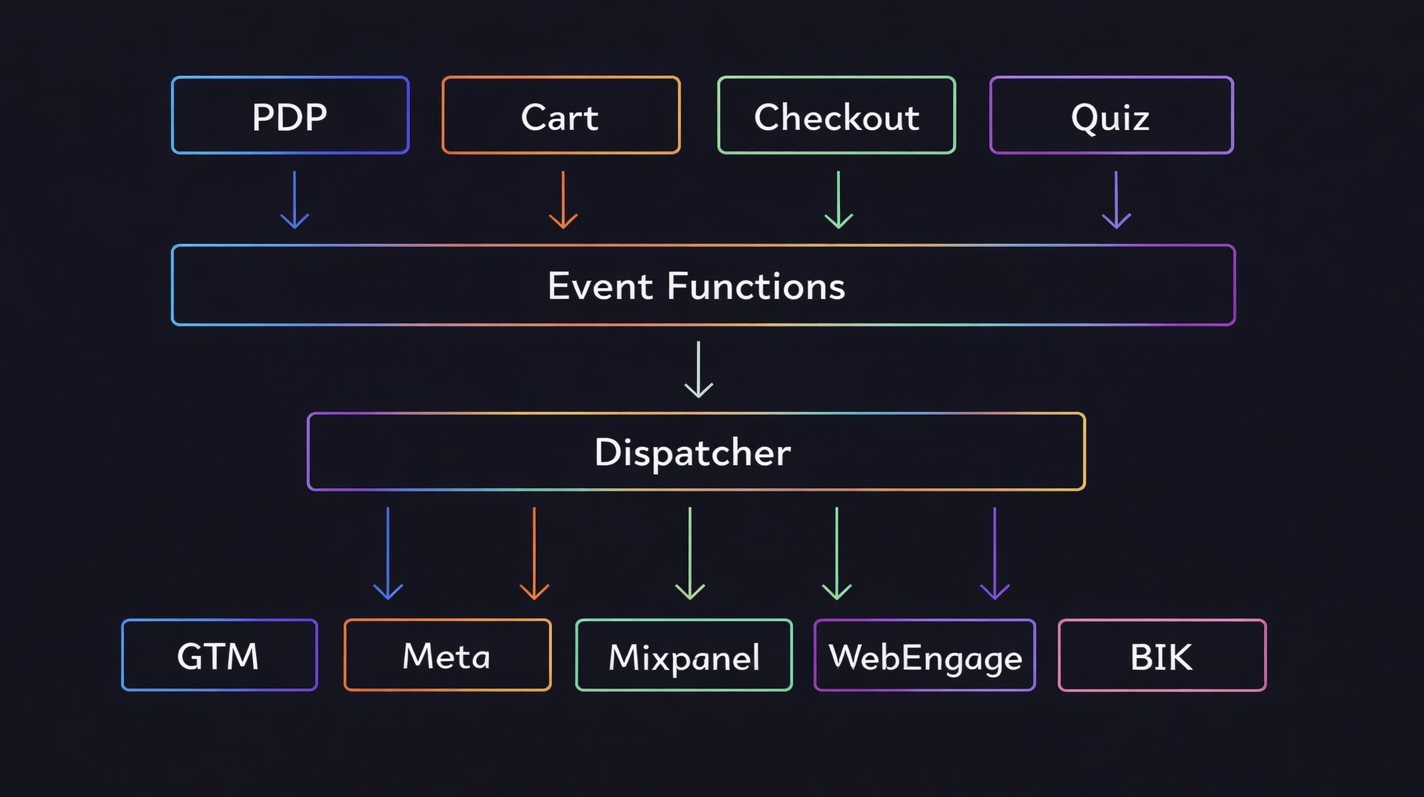
Layer 1: Provider Adapters. Each analytics tool gets a small adapter that implements a common interface. The adapter knows how to talk to its specific SDK. Nothing else in the codebase knows or cares about provider-specific APIs.
Layer 2: Dispatcher. A simple function that takes an event name, data, and a list of target providers. It loops through providers and calls their track method. Each call is wrapped in try-catch so one provider failing does not break others.
Layer 3: Event Functions. Domain-specific functions like addedToCartEvent() that components call. These functions handle data transformation and decide which providers receive each event.
Components become simple:
import { addedToCartEvent } from "@/services/analytics";

const handleAddToCart = () => {
  addedToCartEvent({
    id: product.id,
    title: product.title,
    value: product.price,
    quantity: 1,
    category: product.type,
    source: "PDP",
  });
};
One line. No provider-specific code. No worrying about which SDK is loaded or what format each tool expects.
That event function? Three dispatch calls with mappers:
// src/services/analytics/events/cart.ts
export const addedToCartEvent = (data: CartItemEventData): void => {
  // GA4 gets snake_case
  dispatch("add_to_cart", addToCartGA4Mapper(data), ["gtm"]);

  // Mixpanel and WebEngage get Title Case
  dispatch("Added to Cart", cartItemMapper(data), ["mixpanel", "webengage"]);

  // Meta Pixel gets its specific schema
  dispatch("AddToCart", addedToCartPixelMapper(data), ["meta_pixel"]);
};
Notice the event names: add_to_cart for GA4 (snake_case, per Google's spec), Added to Cart for Mixpanel (Title Case, per their conventions), AddToCart for Meta (PascalCase, per Facebook's standard events). Each provider gets events in their native format with their expected naming. No compromises, no fighting tooling.
Adding a new provider to this event? One line. Changing which providers receive it? Edit the target array. The component never knows, never cares.
How the dispatcher works
The core is surprisingly simple:
// src/services/analytics/tracker.ts
import { providers } from "./providers";
import type { ProviderNameValue } from "./types";

export const dispatch = (
  eventName: string,
  data: Record<string, unknown> | undefined,
  targets: ProviderNameValue[],
): void => {
  for (const provider of providers) {
    if (targets.includes(provider.name)) {
      try {
        provider.track(eventName, data);
      } catch (error) {
        console.error(`Analytics error [${provider.name}]:`, error);
      }
    }
  }
};
Twenty lines. That is the entire dispatcher.
The key design decisions:
Explicit targets. Each dispatch call specifies exactly which providers receive the event. Some events go to all 6 providers. Some only go to GTM. Quiz completion fires a webhook to BIK but does not need to go to CustomerLabs. Explicit targeting means no surprises.
Isolated failures. If Meta Pixel's SDK fails to load, the try-catch ensures GTM, Mixpanel, and others still receive the event. One broken provider never takes down the others.
Fire and forget. No async/await, no waiting for responses. Analytics should never block the user experience. Events fire and the code moves on.
Provider adapters
Each provider implements a common interface:
export interface AnalyticsProvider {
  name: ProviderNameValue;
  track: (eventName: string, data?: Record<string, unknown>) => void;
  identify?: (userId: string, props?: Record<string, unknown>) => void;
  reset?: () => void;
}
Here is what the GTM adapter looks like:
// src/services/analytics/providers/gtm.ts
import { sendGTMEvent } from "@next/third-parties/google";

export const gtmProvider: AnalyticsProvider = {
  name: "gtm",

  track: (eventName: string, data?: Record<string, unknown>): void => {
    if (typeof window === "undefined") return;
    if (!window.dataLayer) return;

    sendGTMEvent({
      event: eventName,
      source_domain: "AVIMEE_HEADLESS",
      ...data,
    });
  },
};
Meta Pixel is slightly more complex because we send events both client-side and server-side for iOS 14+ reliability:
// src/services/analytics/providers/meta-pixel.ts
export const metaPixelProvider: AnalyticsProvider = {
  name: "meta_pixel",

  track: (eventName: string, data?: Record<string, unknown>): void => {
    if (typeof window === "undefined" || !window.fbq) return;

    const eventID = nanoid();

    // Browser-side pixel
    window.fbq("track", eventName, data, { eventID });

    // Server-side Conversions API
    sendCAPIEvent(eventName, { ...data, event_id: eventID });
  },
};
All providers are wired together in one file:
// src/services/analytics/providers/index.ts
export const providers: AnalyticsProvider[] = [
  gtmProvider,
  mixpanelProvider,
  webengageProvider,
  metaPixelProvider,
  bikProvider,
];
Adding a new provider means writing one adapter file and adding it to this array. No other code changes required.
The mapper pattern
Each analytics provider has its own conventions, documented best practices, and expected schemas. Fighting this leads to messy data in dashboards and broken integrations. We embrace it instead.
Different providers expect different data formats:
| Provider | Format | Example |
|---|---|---|
| GA4/GTM | snake_case | item_name, item_id |
| Mixpanel | Title Case | Product Name, Product ID |
| Meta Pixel | camelCase + arrays | content_ids, contents |
Instead of transforming data inline, we use mapper functions:
// src/services/analytics/utils/mappers.ts

// GA4 expects this format
export const addToCartGA4Mapper = (data: CartItemEventData) => ({
  currency: "INR",
  value: data.value * data.quantity,
  items: [
    {
      item_id: data.id,
      item_name: data.title,
      price: data.value,
      quantity: data.quantity,
    },
  ],
});

// Mixpanel expects this format
export const cartItemMapper = (data: CartItemEventData) => ({
  Currency: "INR",
  ID: data.id,
  Title: data.title,
  Value: data.value,
  Quantity: data.quantity,
  Source: data.source,
});

// Meta Pixel expects this format
export const addedToCartPixelMapper = (data: CartItemEventData) => ({
  content_ids: [data.id],
  content_type: "product",
  contents: [{ id: data.id, quantity: data.quantity, item_price: data.value }],
  currency: "INR",
  value: data.value,
});
Remember the addedToCartEvent() function from earlier? Each of those three dispatch calls uses a mapper: addToCartGA4Mapper transforms the data into GA4's snake_case format, cartItemMapper into Mixpanel's Title Case, and addedToCartPixelMapper into Meta's schema.
This means GA4 gets item_id and item_name (exactly what Enhanced Ecommerce expects), Meta gets content_ids and contents (exactly what the Pixel API expects), and Mixpanel gets Product Name and Product ID (clean, readable properties in dashboards). No forced compromises. No product_id showing up in a Title Case tool or Product Name in a snake_case schema.
The component calling addedToCartEvent() does not need to know any of this.
The folder structure
src/services/analytics/
├── index.ts              # Public exports
├── tracker.ts            # dispatch() function
├── types.ts              # Interfaces and types
├── constants.ts          # Shared properties
├── providers/
│   ├── index.ts          # Provider array
│   ├── gtm.ts
│   ├── meta-pixel.ts
│   ├── mixpanel.ts
│   ├── webengage.ts
│   └── bik.ts
├── events/
│   ├── cart.ts           # addedToCartEvent, removedFromCartEvent
│   ├── product.ts        # productViewedEvent
│   ├── checkout.ts       # purchaseEvent
│   ├── quiz.ts           # QuizCompletedEvent
│   └── user.ts           # loginEvent, logoutEvent
└── utils/
    ├── mappers.ts        # Data transformers
    └── user-data.ts      # Meta CAPI helpers
Everything analytics-related lives in one place. Need to find where Add to Cart is defined? It is in events/cart.ts. Need to see what data goes to Mixpanel? Check the mapper. Need to debug why Meta is not receiving events? Look at providers/meta-pixel.ts.
What changed after
Adding a new event: 2 hours → 15 minutes. Define the typed interface, write one event function with mappers, call it from the component. No hunting through files, no copy-pasting.
Adding a new provider: days → 30 minutes. Write one adapter file, add to the providers array, update event functions to include the new target where needed. We estimated adding Amplitude would take under an hour.
Debugging: half a day → 10 minutes. Marketing says an event is missing? Check the event function to see which providers are targeted. Check the provider adapter to see if the SDK is loading. The entire flow is traceable in three files.
Onboarding: confusing → 15 minutes. I taught this system to a new intern in 15 minutes. They shipped their first analytics event the same day. With the old scattered approach, it would have taken days just to understand where everything lived.
Consistency: finally achieved. One event function means one source of truth. No more Product Name vs ProductName vs product_name. Every provider receives consistently formatted data.
What we are still improving
The mappers file is getting large. With 18 events and 6 providers, we have a lot of transformation functions. We are considering splitting mappers by domain (cart mappers, quiz mappers) or by provider (GA4 mappers, Pixel mappers).
No retry for failed events. If a provider's SDK fails to load, the event is lost. For critical events like Purchase, we might add a small queue that retries failed sends. For now, the dual-tracking approach with Meta (browser + server-side) handles the most important case.
Type safety could be stricter. We use Record<string, unknown> for event data in the dispatcher. Provider-specific types at the adapter level would catch more errors at compile time.
The architecture is not perfect. But it is maintainable, debuggable, and extensible. When marketing asks to add a new event next week, it will take 15 minutes instead of 2 hours. When we need to add a seventh analytics provider, it will take 30 minutes instead of touching every component.
What would we tell someone building this?
Start with the dispatcher pattern, even if you only have two providers. The abstraction pays off immediately in code cleanliness. It pays off even more when you inevitably add a third and fourth provider.
Make targets explicit. Do not send every event to every provider by default. Different tools serve different purposes. Your CDP does not need page view events. Your ad pixel does not need internal debug events. Explicit targeting keeps each provider's data clean.
Invest in mappers early. Provider schemas will never align. Fighting this is pointless. Accept it, write transformation functions, and move on. The mapper pattern keeps provider-specific formatting out of your business logic.
Document with folder structure. We did not write extensive documentation. The folder structure is the documentation. Events live in /events, providers live in /providers, transformations live in /utils/mappers. Anyone can find what they need.
Measure onboarding time. The real test of clean architecture is how quickly a new developer becomes productive. If explaining your analytics setup takes an hour, something is wrong. If it takes 15 minutes, you are on the right track.
Analytics does not have to be messy. A few hundred lines of infrastructure code gave us a system that is easy to debug, easy to extend, and easy to teach. The next time someone asks you to "just add this event to all our analytics tools," you will know there is a better way.